
Inbound Calls
Have your outbound bot dial Noveum numbers so synthetic personas can test it, one run at a time.
In an inbound batch the direction is reversed: instead of NovaSynth calling your agent, your bot places the call. Each run in the batch is one persona-scenario test case. Your script claims a run, the platform parks the synthetic persona on one of your provisioned Noveum phone numbers, and hands that number to your dialler. Your bot calls it, talks to the persona, and the platform records and scores the conversation.
Create an inbound Phone connection and a Voice batch first. Unclaimed runs expire after 14 days by default. After claiming a run, dial within the shorter window returned by call.seconds_remaining.
Install
pip install noveum-traceThe script
The loop below runs the calls sequentially, one at a time. Claim a run, dial the number it hands out, wait for the platform to mark the run finished, move on to the next.
from noveum_trace.novasynth import Call, CallQueue


NOVEUM_API_KEY = None
ORGANIZATION_SLUG = "your-org-slug"

RUN_IDS = [
    "run_id_1",
    "run_id_2",
]


def place_call(call: Call) -> None:
    raise NotImplementedError("dial call.dial_number with your bot here")


if __name__ == "__main__":
    queue = CallQueue(
        RUN_IDS,
        api_key=NOVEUM_API_KEY,
        organization_slug=ORGANIZATION_SLUG,
    )
    for call in queue.iter_calls():
        print(
            f"[{call.run_id}] dial {call.dial_number} "
            f"({call.persona_name} / {call.scenario_name}, "
            f"{call.seconds_remaining:.0f}s left)"
        )
        try:
            place_call(call)
        except Exception as exc:
            print(f"[{call.run_id}] dial failed: {exc}")
            continue
        print(f"[{call.run_id}] finished: {call.wait_until_finished()}")
    print("summary:", queue.summary())
Get your run ids
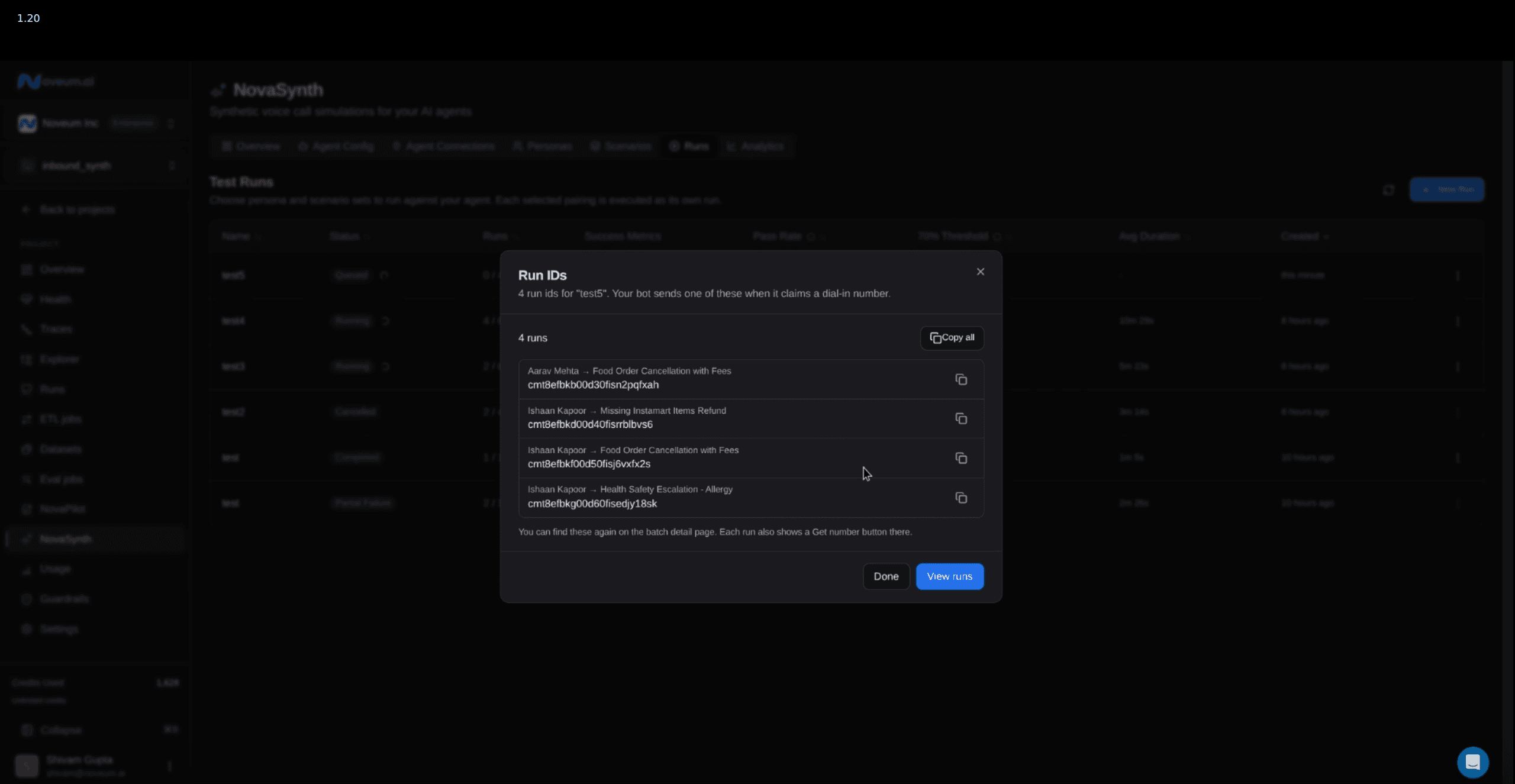
Go to the Runs page of NovaSynth in your project, click New Test Batch, and choose an inbound Phone connection on the Connection step. After you click Launch run, the Run IDs dialog lists every run in the batch:
What you fill in
| Field | Contract |
|---|---|
NOVEUM_API_KEY | Your Noveum API key, or None with the NOVEUM_API_KEY env var set |
ORGANIZATION_SLUG | Your organization slug, shown in the dashboard URL |
RUN_IDS | The run ids from the Run IDs dialog, pasted between the brackets |
place_call | The only method you implement: make your bot dial call.dial_number |
The loop needs no changes after you implement place_call.
The place_call contract
Each claimed run hands your dialler a Call object:
| Attribute | Meaning |
|---|---|
call.dial_number | E.164 number to dial, e.g. "+918065481242" |
call.profile | Dict of this test's customer profile (name, phone, account details, situation). Pass it to your bot the same way you would for a real customer |
call.persona_name | For your logs |
call.scenario_name | For your logs |
call.seconds_remaining | Dial before this hits 0; the window is about 5 minutes |
Guidelines:
- Dial within
call.seconds_remaining. Late calls are rejected and the run is marked expired. - Return when the call has ended, or return right away; either is fine, the loop waits for the platform to mark the run finished.
- Raise on a dial failure (busy, no route, ...). The run is skipped and the number is released when its window closes.
Run it from an AI agent
If your coding agent is connected to the Noveum MCP server and can place calls through your bot, it can run the batch without the script. Run the run_novasynth_inbound_batch prompt with your project id and batch id; clients that render prompts as slash commands show it as /run_novasynth_inbound_batch. It follows the same loop with these tools:
| Tool | What it does |
|---|---|
list_novasynth_inbound_run_ids | Every run id in the batch, oldest first |
claim_novasynth_inbound_call | Claims a run and waits until it is ready, then returns the number, the profile and the seconds left to dial |
wait_for_novasynth_inbound_call | Waits until the run is completed, failed, expired or cancelled |
reset_novasynth_inbound_run | Resets an expired run so it can be claimed again |
Each tool returns after about 45 seconds at most. If the run is not ready or finished by then, the agent calls it again. An expired run is retried twice, after 10 and then 30 seconds. A run whose dial failed is not retried.
If every number for your endpoint's country is busy, a claim waits for one to free up for at most 30 minutes, the same limit the script uses. After that the agent records the run as no_number and moves on. The run stays unclaimed, so running the batch again later picks it up.
You can also run inbound calls without a dashboard batch through the Developer Calls API.
Read the results
queue.summary() prints the terminal state of every run, e.g. {'completed': 5, 'expired': 1}. Finished runs appear on the batch detail page like any other batch and follow the same analysis lifecycle.