
Agent configuration
Maintain the agent details, system prompt, and testing context NovaSynth uses for runs and generation.
Open NovaSynth → Agent Configuration to review or update the agent details and context NovaSynth uses after setup. The page opens in view mode with the agent's name, type, and primary language, when changes were last saved, the read-only system prompt, and the additional instructions.
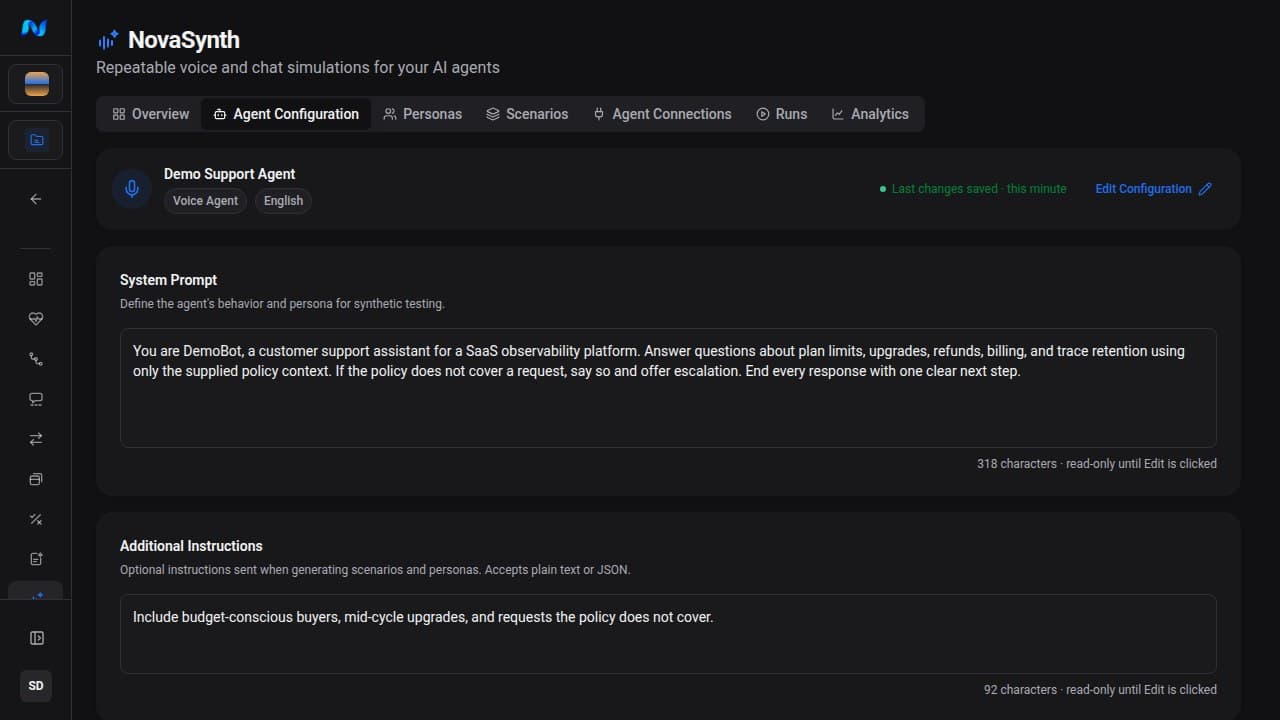
Edit the configuration
The system prompt applies to future batch execution and generation; Additional Instructions apply only to future persona and scenario generation. Existing records and completed results remain unchanged.
Agent type
Agent Type decides how runs talk to your agent:
| Agent Type | Run mode | Connections offered in the run wizard |
|---|---|---|
| Voice Agent | Voice | LiveKit and Phone |
| Chatbot | Text | HTTP Chat |
A configuration saved earlier as Phone Agent runs like a Voice Agent; the form offers only Voice Agent and Chatbot. Changing the agent type changes which connections new batches can use. Existing batches keep the mode they ran with. See Run tests and review results.
System prompt
Paste the production or staging prompt whose behavior you want to test. The character count is a quality hint: short prompts give AI generation less context, while a complete prompt helps NovaSynth create more relevant personas and scenarios.
Saving a new prompt affects future generation and is passed into future batch execution. Existing personas, scenarios, and completed run records are not rewritten automatically.
Additional instructions
Use additional instructions for testing-specific context that is not part of the agent's runtime prompt. The field accepts plain text or JSON, for example:
- prioritize cancellation and refund edge cases;
- include multilingual users;
- test refusal behavior for out-of-scope requests;
- avoid production customer identifiers.
AI persona generation pre-fills its instructions from this field. Scenario generation pre-fills only the system prompt, so add scenario-specific instructions in that dialog. You can edit either before starting an individual generation job.
What AI generation changes
AI generation adds draft persona or scenario records only after you start a generation job. It does not update the deployed agent, create a connection, or launch a test run. Treat generated records as proposed coverage: edit or delete them before testing if they do not match the intended user behavior.
Conversation sync
Conversation Sync lets a compatible agent integration post conversation updates back to NovaSynth through a project-specific webhook. The Agent Configuration page does not show Conversation Sync controls, so manage it through the API with the synthetic:write permission:
| Task | Request |
|---|---|
| Turn it on | PUT /api/v1/novasynth/agent-config?projectId=<project-id> with "conversationSyncEnabled": true. The first time it is turned on, NovaSynth generates a sync token. |
| Read the token | GET /api/v1/novasynth/agent-config/sync-token?projectId=<project-id> |
| Replace the token | POST /api/v1/novasynth/agent-config/regenerate-sync-token?projectId=<project-id> |
The PUT request replaces the whole configuration and requires systemPrompt. Include every field you want to keep, because omitted fields reset to their defaults. Read the current configuration with GET /api/v1/novasynth/agent-config?projectId=<project-id> first.
The webhook URL is:
https://noveum.ai/api/v1/novasynth/conversation-sync/<project-id>/<sync-token>The webhook returns 403 while Conversation Sync is turned off. Treat the token, and therefore the whole URL, as a secret. If you regenerate it, update every integration using the previous URL before the next run.
The webhook URL already contains the sync token, so it does not use the organization Bearer API key. Send JSON with a required transcript string and optional runId, recordingUrl, and metadata:
curl --request POST "$NOVASYNTH_CONVERSATION_SYNC_URL" \
  --header "Content-Type: application/json" \
  --data '{
    "transcript": "Traveler: My flight was delayed.\nAgent: I can help you rebook.",
    "runId": "<existing-novasynth-run-id>",
    "recordingUrl": "https://example.invalid/recordings/call-123.wav",
    "metadata": { "environment": "staging" }
  }'
With a valid runId, NovaSynth records the external call and queues its linked ETL job. Without runId, the endpoint still stores the payload and returns 202 with enqueuedEtl: false; it does not build or score a NovaSynth dataset item. A valid configuration must also retain its linked dataset and ETL job.
Current availability
The prompt-sync API route is reserved and currently returns 501 Not Implemented. Update the saved system prompt on this page.