
Recommendations
Run NovaPilot against a dataset and turn its ranked findings into focused follow-up work.
The Recommendations page displays one NovaPilot report at a time. When a project has several reports, use the selector in the in-page report toolbar to switch between them. The selected report is stored in ?report={reportId}, so a copied URL reopens that same report for an authorized teammate.
Recommendations are advisory. NovaPilot does not need repository access and never writes a prompt, switches a model, changes parameters, edits tools or code, deploys an application, or opens a pull request. Treat every proposed change as a hypothesis to verify in the source traces and a new evaluation.
Run an analysis
Check the live preview. It shows matching items out of the dataset total and estimates credits from matching items that have evaluation scores. NovaPilot validates the scorer results before analysis and charges for the items with valid results.
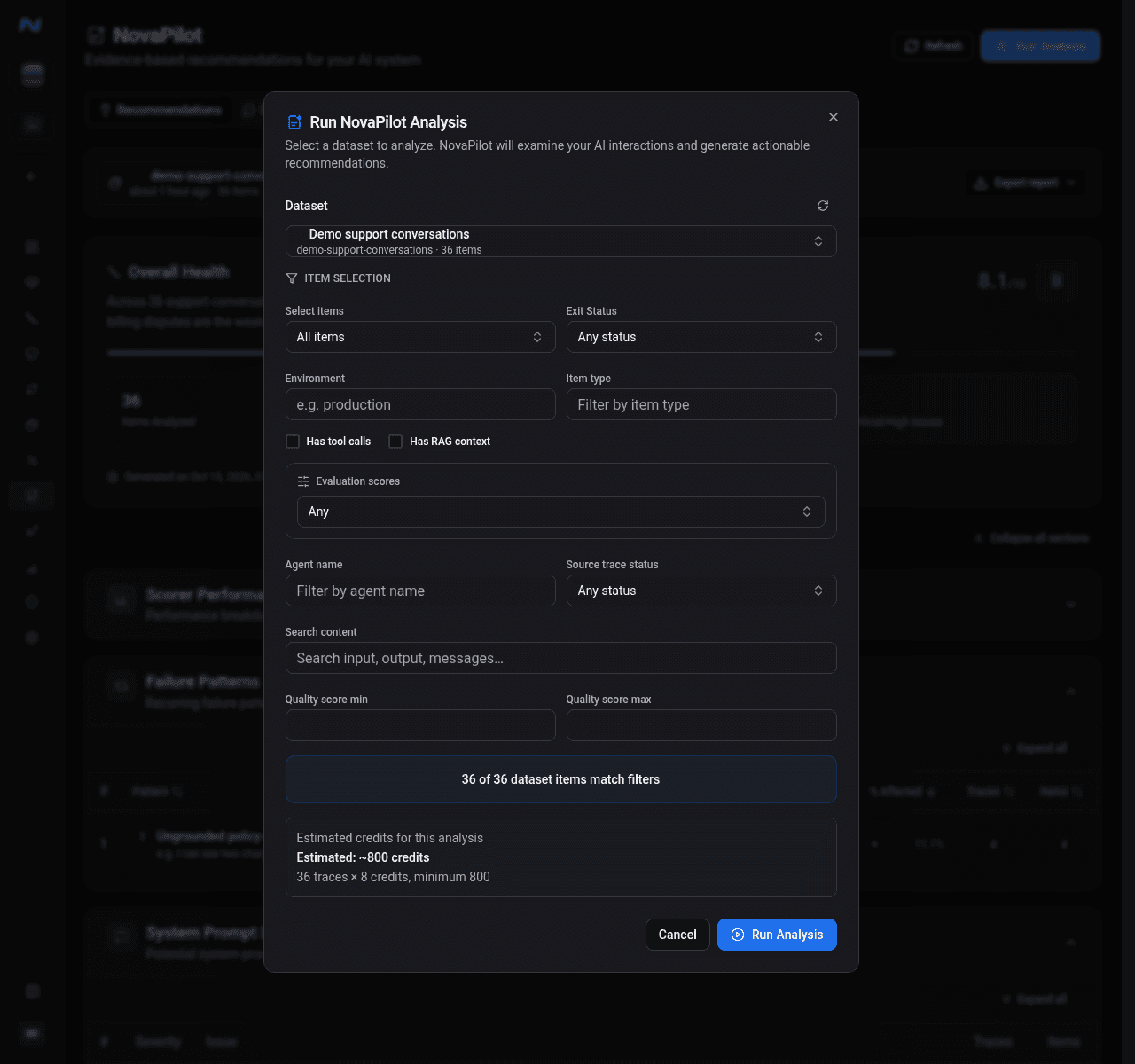
Available filters include count and date ranges, environment, item type, exit status, tool or RAG presence, evaluation-score presence, agent name, content search, quality range, and source-trace status. The NovaPilot dialog does not expose scorer-threshold filters. The run action stays disabled when the preview is loading, fails, matches zero items, has no matching item with an evaluation score, or exceeds the 10,000-scored-item run limit. If recorded results are invalid, the server rejects the run with the scorer-coverage error.
Use the run dialog in this order:
| Control | What to check |
|---|---|
| Dataset | The dataset is associated with the current project and contains the evaluated items you intend to analyze |
| Item scope | All items, a count or time preset, or an advanced filter that describes the comparison cohort |
| Matching items | The preview count is nonzero and plausible relative to the dataset total |
| Estimated credits | 8 credits per matching item with an evaluation score, with an 800-credit minimum; the final charge uses items with valid scorer results |
| Run Analysis | Enabled only after the selection and preview are valid, at most 10,000 scored items match, and the cohort has recorded scorer coverage |
The analysis starts in Queued, moves to Processing, and finishes as Completed or Failed. You can cancel a queued or processing report. Starting again after a failure creates a new report; it does not resume the failed run.
Work through recommendations
The report groups findings into scorer performance, failure patterns, system-prompt issues, and actionable recommendations.
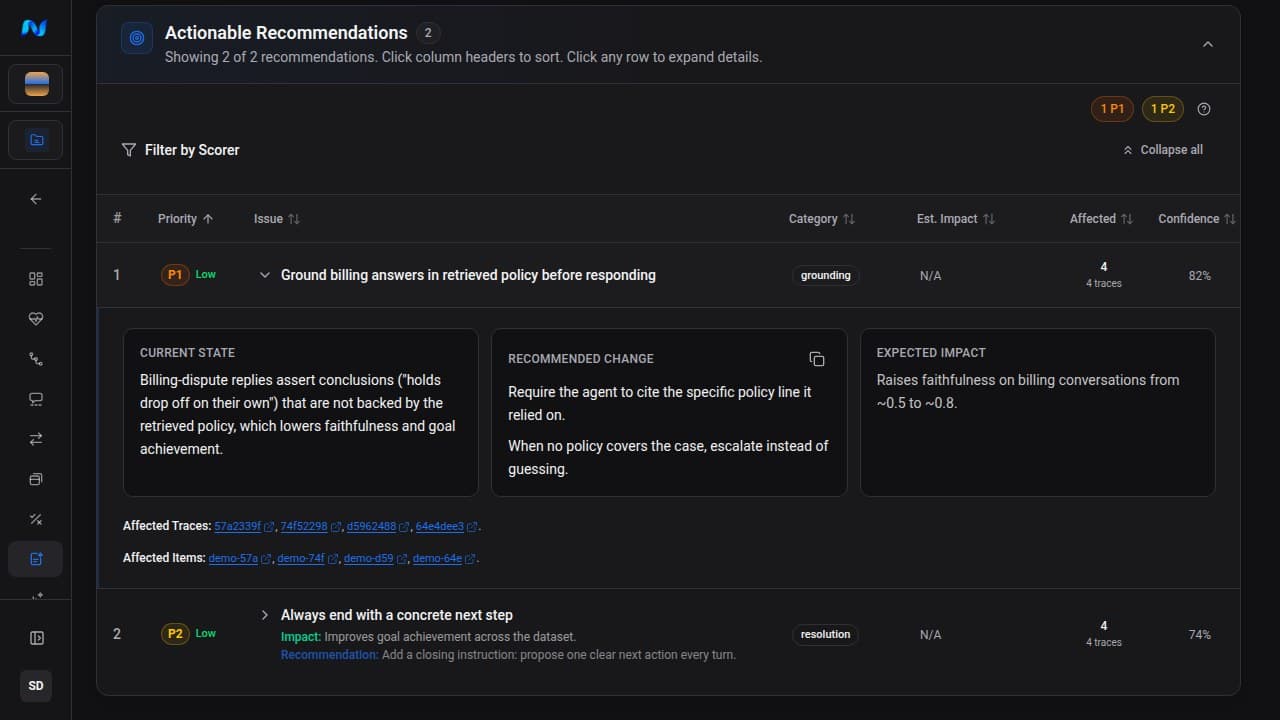
Each recommendation row shows:
| Field | How to use it |
|---|---|
| Priority | Severity and breadth of the issue: Critical, High, Medium, or Low |
| Effort | Low, medium, or high implementation effort |
| Issue and category | What is wrong and the report-provided category for that finding |
| Estimated impact | Average and maximum predicted scorer improvement |
| Affected | Number of items and traces supporting the finding |
| Confidence | How strongly the available evidence supports the recommendation |
Expand a row to see the current state, copy the recommended change, inspect expected scorer movement, and follow affected item or trace IDs back to the source evidence.
Interpret one recommendation
Treat estimated score movement as a hypothesis. If your team decides to proceed, implement one focused change outside Noveum, evaluate new traffic, and compare a new report before adopting it broadly.
Filter and export
Use Filter by Scorer to focus the table on recommendations that estimate an improvement for specific scorers. The priority counts update with the filter.
For a completed report, open Download report and choose PDF or Markdown. Open the report under Reports when you need email controls.
Empty and limited-data states
- If the project has no reports, click Run First Analysis.
- If the project has no associated datasets, create and associate a dataset first.
- If more than 10,000 scored items match, use count, time, or advanced filters to create a smaller cohort.
- If no item has a valid scorer result, resolve scorer errors or run an eval job before starting NovaPilot.
- If a report has no useful low-scoring evidence, its recommendations may be limited.
- If NovaPilot marks the report as insufficient data, add evaluated items before treating its grade as reliable.