
NovaGuard (beta)
Configure the cost-cap and request or token rate-limit policies currently available in NovaGuard beta.
NovaGuard is Noveum's runtime policy product and is currently in beta. The dashboard configures spending limits, request and token limits, and content policies at organization or project scope.
A saved policy becomes effective only through a connected gateway or runtime that fetches the policy, enforces it before the provider call, and reports the decision to Noveum.
Create and verify a policy
202 acknowledgement.Start with a generous non-production limit so you can verify policy delivery and reporting without interrupting legitimate traffic. Tighten the threshold only after the runtime log and API acknowledgement agree on the test decision.
What the dashboard supports
The dashboard supports cost caps, rate limits, model allowlists, token-length caps, regular expressions, banned substrings, PII and secret detection, prompt-injection detection, topic restrictions, content moderation, JSON schemas, scorer gates, and grounding checks. Content rules are evaluated by the connected gateway against request or response content. Cost and rate policies use platform counters and the admission API. Available actions depend on policy type.
| State | Current dashboard behavior |
|---|---|
| Enabled | The policy is included in the effective policy set returned to the enforcing client. |
| Disabled | The policy remains saved but is omitted from the effective set. |
Choose Enforce to apply the policy decision, Shadow to observe it without blocking, or Off to stop applying it. Use Shadow or non-production traffic to verify a policy before enforcing it. The separate Enabled switch controls whether it is included in the effective policy set.
Edit, pause, or delete a policy
Use a policy row's actions to edit its name, description, threshold, or Fail closed behavior. The policy type is immutable: replace a cost cap with a rate limit, or vice versa, by creating a new policy and then deleting the old one.
Use the Enabled switch when you may need the policy again. A disabled policy remains saved but disappears from the effective policy response, so connected runtimes stop enforcing it after their cached response expires.
Delete is a permanent dashboard action, not an archive or pause. The API returns 204 No Content, and the deleted policy no longer appears in list or effective responses. Disable the policy instead when you may need to restore it later.
Cost caps
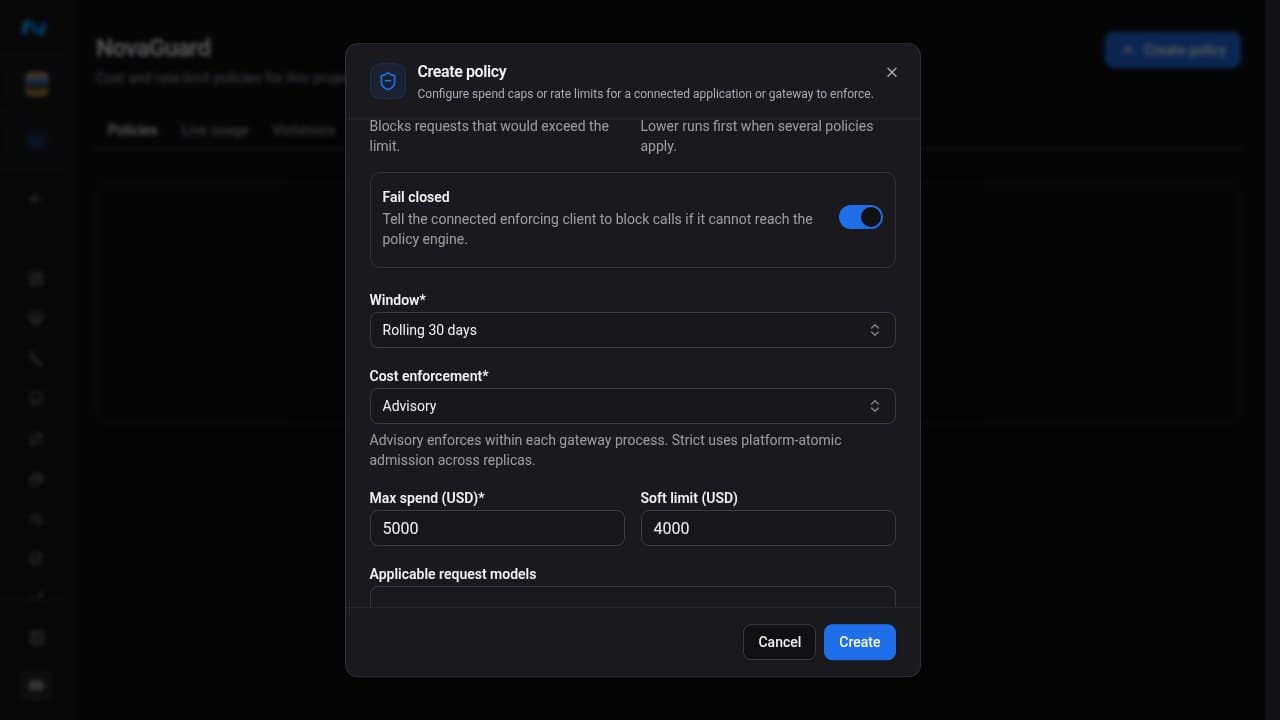
A cost cap sets a USD ceiling for one window:
- rolling 24 hours
- rolling 7 days
- rolling 30 days
- daily (UTC calendar)
- monthly (calendar)
Max spend is the blocking threshold. Soft limit is optional and must be lower than the maximum. NovaGuard includes it in the effective policy so a connected runtime can treat it as an earlier warning threshold; it does not replace the hard block, and the usage endpoint does not make the warning decision for the runtime.
Cost enforcement is Advisory by default, which enforces the cap within each gateway process. Strict uses platform-atomic admission across replicas. Applicable request models takes one model per line and only selects which requests the cap checks; matching requests are still compared with total project or organization spend for the window. Leave it empty to check every model.
Rate limits
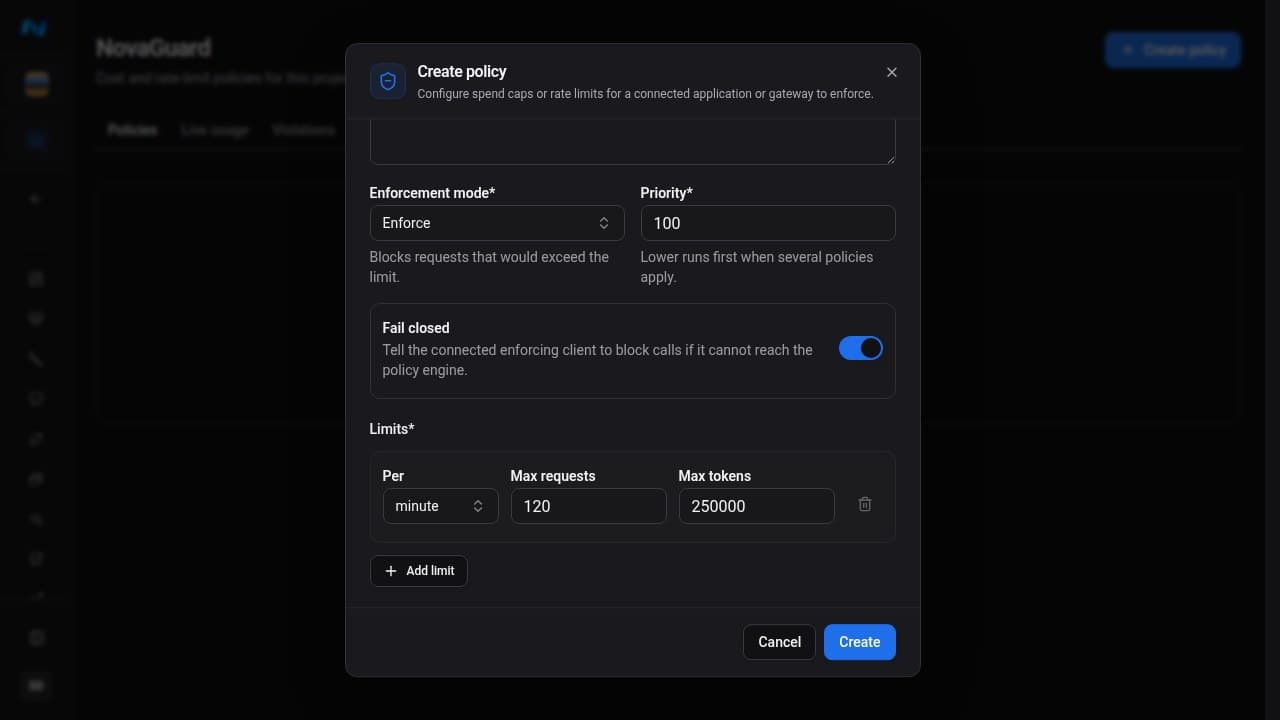
A rate-limit policy contains one or more windows. Each window uses a period of one minute, one hour, or one day and requires at least one of:
- maximum requests
- maximum tokens
Use multiple windows when you need both burst protection and a longer-term ceiling - for example, requests per minute plus tokens per day.
Fail closed
Every dashboard policy has a Fail closed switch, enabled by default. It tells the enforcing integration what to do when policy state cannot be reached:
- On - block the call. This protects the limit but reduces availability during a policy-service outage.
- Off - allow the call. This protects availability but cannot guarantee the limit during the outage.
Organization and project scope
Organization policies apply across the organization. Project policies apply to one project. On a project's NovaGuard page, Effective policies combines enabled policies from both scopes and labels their source.
If an organization policy and project policy have the same name, the project policy replaces the organization policy in that project's effective set. Remaining policies are ordered by ascending priority, with project policy first when priorities tie.
Reported usage events
The project usage endpoint accepts events reported by the enforcing integration. An allowed event records model, token counts, request count, and cost. A blocked event records the blocking policy type and optional policy ID or reason. These records describe a decision after it occurred; the usage endpoint does not make the blocking decision for the caller.
Open Violations to inspect reported blocked decisions and filter by policy type, model, and time. Effective policies shows scope, current usage, and remaining headroom. Use Dry run with a request estimate to inspect counter-based decisions; inline content policies still require gateway evaluation.
Blocked-event email alerts
When the integration reports at least one BLOCKED event, Noveum emails the
organization's owners with a link to the relevant organization or project NovaGuard
page. Alerts are rate-limited to avoid repeated notifications for the same scope.
Each owner receives the alert in their stored interface language. When no supported language is stored, Noveum uses the default language.
The alert depends on ingestion of the blocked event. If a gateway blocks a request but does not report that event, Noveum cannot record the decision or send the owner notification.
Availability and permissions
Guardrails are enabled only for organizations with NovaGuard access. The page shows an availability notice when the capability is disabled.
Creating or editing policies requires guardrails:write, deleting requires guardrails:delete, reading effective policies requires guardrails:read, and reporting usage requires guardrails:ingest.
Related
- Connect a runtime - fetch policies and state, enforce them, and report outcomes
- Billing and credits - subscription quotas, which are separate from runtime guardrails
- Roles and permissions
- Eval jobs - evaluation costs are controlled by billing quotas, not these runtime policies