
Voice Agent Debugging: How to Trace a Failed Call to Its Root Cause

Pragati Tripathi
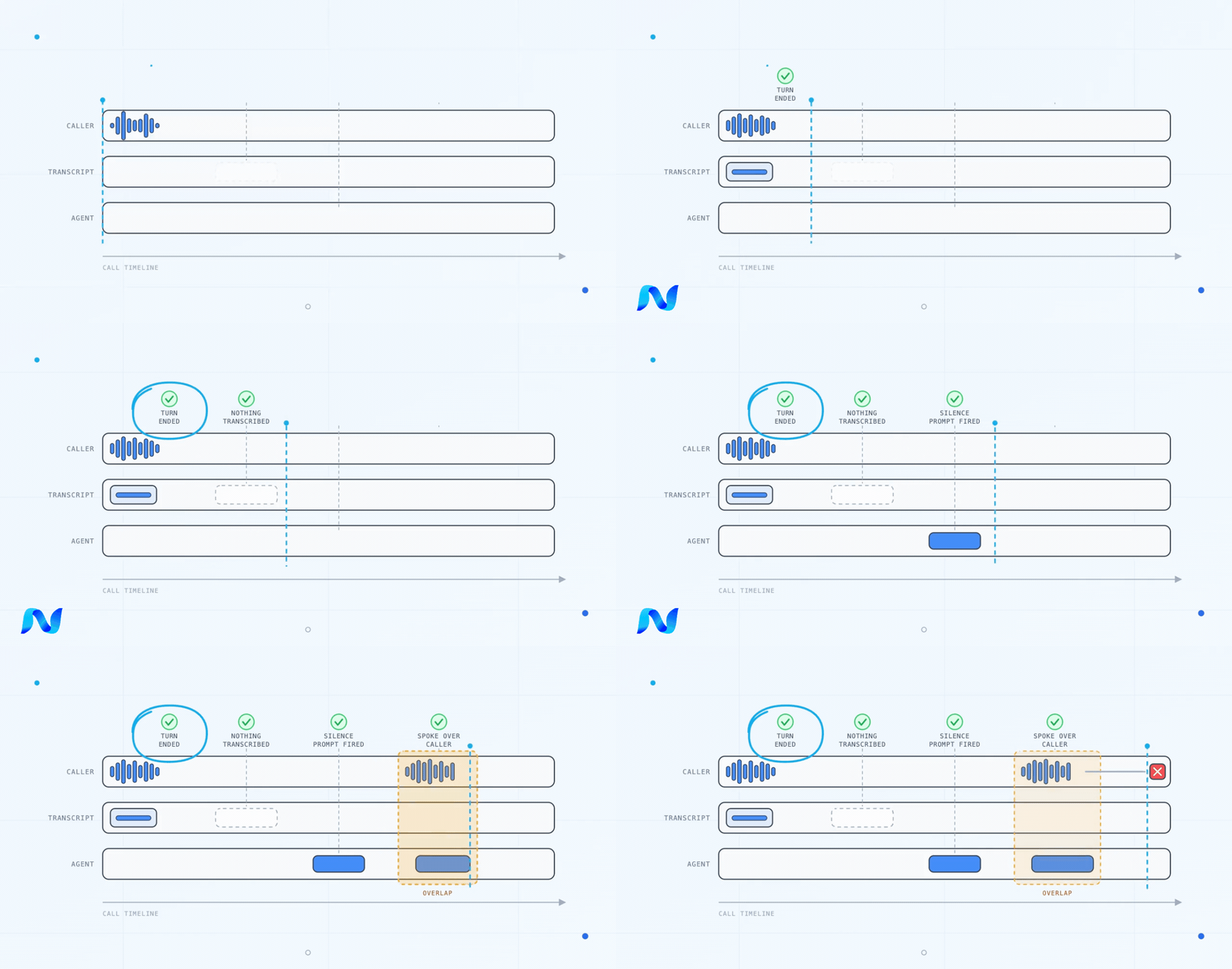
The voice agent asked "are you there?" while the caller was in the middle of answering. Then it asked again. The caller hung up on the third one.
Open that call and the model output looks clean. No malformed output, no invented tool, nothing you can detect. On that deployment the gibberish score came back at 9.9 out of 10. The failure started two layers upstream of the model, and no prompt edit was ever going to reach it.
Key takeaways on voice agent debugging and root cause analysis
- A voice call passes through six layers before the caller hears anything, and the layer where you see the failure is almost never the layer that caused it.
- The first error in a trace is rarely the first meaningful failure. Voice pipelines fail quietly: a wrong transcript returns a success status and a well-formed sentence.
- Prompt edits are the most-reached-for fix and the least reliable. Across an audit of 18,452 production turns, nine prompt-rule fixes were tested on real calls. One moved the score.
- A root cause is not a fix. Every root cause routes to one of four layers, prompt, model, API, or flow, and each one is proven a different way.
What Voice Agent Failures Are Callers Experiencing?
Most of the voice agent debugging carried out at Noveum highlights these symptoms shared in the left column. The middle column is where AI teams look first, which is rarely where the symptom points. The third column names the area the evidence usually lands in, not a verdict.
| Caller visible symptom | Check first | Likely failure area |
|---|---|---|
| Agent asks "Are you there?" while the caller is still talking | Turn detection | Interruption handling |
| Agent answers a question nobody asked | Speech-to-text output | Mishearing |
| Long silence before the agent replies | Model and TTS spans | Latency |
| Booking confirmed, but nothing appears in the calendar | Tool arguments and response | Tool execution |
| Live caller is treated as a wrong number | Model decision and state | Agent logic |
| Caller hangs up within the first two turns | Opener and conversation flow | Early drop-off |
Why do voice agents fail in production?
Voice agent debugging is the work of tracing a failed call backward from what the caller experienced to the first span whose output was wrong.
A voice call passes through six layers before the caller hears anything, and all six run against a real-time budget. When one of them fails, its output reaches the model looking entirely plausible. The model then reasons correctly on bad data. What surfaces is a symptom that looks like a reasoning error and is not one, which is why tightening the prompt is the most common fix and so rarely the one that works.
The unit of debugging is the whole call. A turn that scores badly is often the consequence of a turn three exchanges earlier that scored fine.
What we'll discuss on voice AI observability
- How to read a voice trace span by span and find the first failure that mattered
- How to separate a pipeline failure from an agent failure with a single test
- How to route each root cause to the layer that can move it, and how to prove the fix held
Why trust this voice AI debugging guide
Every pattern here comes from audited production deployments: 4,026 engaged calls, 18,452 agent turns, scored with Noveum's library of 125+ scorers, roughly 330,000 individual scores. That includes the fixes that were tested and did not work.
Trace your own voice calls span by span. Start free in 60 seconds.
What does a voice agent trace contain?
A trace is the recording of what your agent did. A span is one timed entry inside that recording.
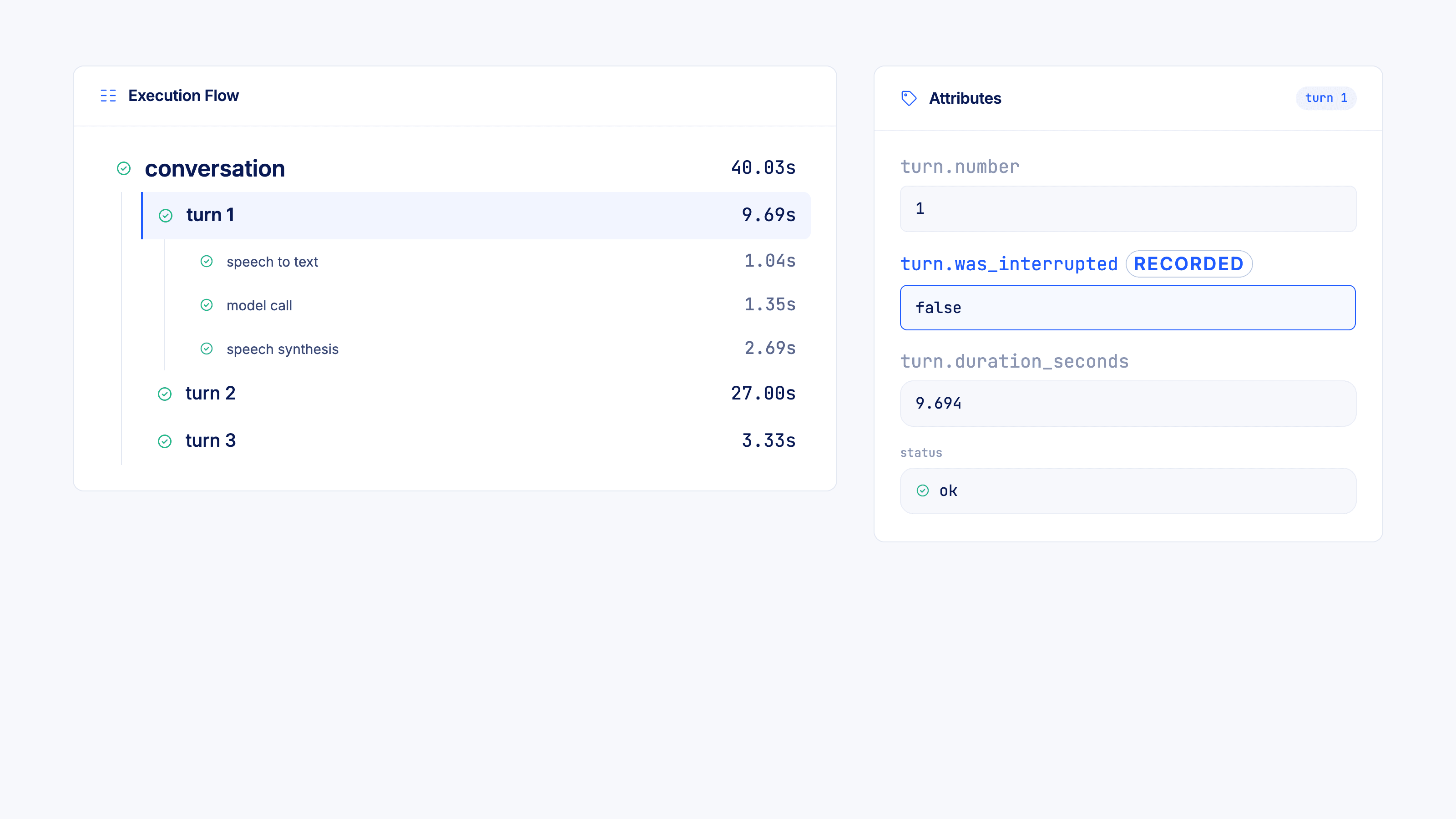
Open a real voice trace and the structure is short. The outermost span is the conversation. Under it sit the turns, one per back-and-forth with the caller. Under each turn sit the three things that happen inside a turn:
conversation                        40.03s
  turn 1                             9.69s
    speech to text                   1.04s
    model call                       1.35s
    speech synthesis                 2.69s
  turn 2                            27.00s
    speech to text                   1.20s
    model call                     745.6ms
    speech synthesis               477.0ms
  turn 3                             3.33s
Every span carries an id, its parent's id, a name, start and end times, a duration in milliseconds, and a status. The parent id is what makes the tree navigable, and it helps you walk backward from a symptom.
One thing worth correcting early: a trace is not always one whole call. In the deployment above, roughly 19,500 dials produced about 125,000 traces, so a trace is a segment of a conversation holding several turns. Check how your own Voice AI instrumentation groups them in production before you assume a trace boundary matches a call boundary.
What are the span types in a voice trace, and what does each one hold?
The turn span holds the turn number, its duration, and a true or false flag recording whether the caller interrupted the agent. That flag is the most direct signal in the trace for barge-in problems, and it is easy to miss because nothing surfaces unless you filter for it.
The speech to text span holds a reference to the caller's own audio, playable from inside the trace. If you are debugging a mishearing, you can listen to what the caller said instead of arguing about it.
The model span is the dense one. It holds the model name, temperature and sampling settings, the complete instruction set the agent was operating under, the full schema of every tool the agent was allowed to call, time to first token, input and output token counts including cached reads, the cost of that single turn, and the exact tool call the model made with the exact values it passed.
The speech synthesis span holds the generated audio and its duration.
Two of those fields change what you can debug, not just what you can see.
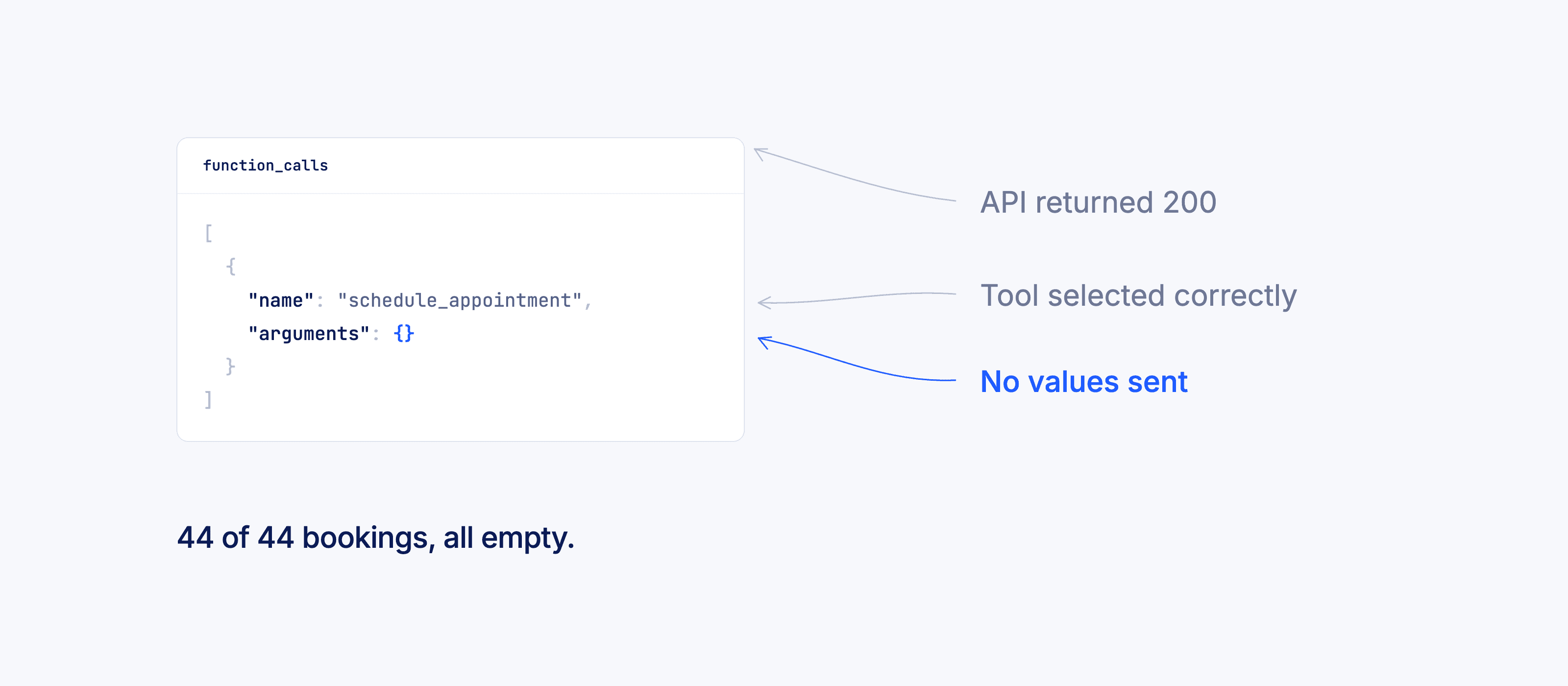
The tool call arguments are stored, so a malformed call is observable rather than inferred. When a booking goes out with an empty arguments object, you are not reasoning backward from a missing calendar entry. You open the model span, read function_calls, and the tool name sits next to the values it was handed. That is how a 44-of-44 empty-parameter defect gets found in an afternoon instead of a sprint.
The full instruction set is stored on every model span, so the prompt becomes a groupable dimension. Cluster your model spans by the system prompt that produced them and you get your actual agent topology rather than the one in your project config. On one deployment, clustering turned 368 distinct prompt variants into 16 functional sub-agents.
Noveum captures these spans through NovaTrace, an open-source SDK for Python and TypeScript that is aligned with OpenTelemetry, the industry standard for tracing.
How do you find the first meaningful failure while debugging a voice trace?
Error status is a weak signal in a voice pipeline, because almost nothing throws. Speech-to-text returns a well-formed string on a bad decode. The model returns a valid completion on a bad transcript. The tool returns 200 on an empty payload. Filter a failing deployment by status != ok and you will get back a nearly empty set while 40% of its calls are going wrong.
What you are looking for is the first span whose output is wrong while its status is fine. Everything downstream of that point is correct behaviour on corrupted input, which is why each step looks defensible in isolation, and why reviewing model outputs alone will never surface it.
From the audit. A caller answered in Hindi. The transcript came back truncated mid-sentence, status ok, no error raised. Every span after that point behaved correctly in half a sentence.
How to walk a voice trace, step by step
- Fix the outcome first. Write down what the caller wanted and what happened instead, one sentence each. Without this the trace has no reference point and you will drift toward whatever looks unusual.
- Read backward from the symptom to the last span whose output you can confirm was correct.
- Read forward from that span, one span at a time, and stop at the first output that is wrong on its own terms, regardless of status.
- Check the input to that span before blaming the span. If the transcript is wrong, listen to the audio. If the tool parameters are empty, check whether the model was ever given the value.
- Compare against a call that succeeded on the same path. A single trace tells you what happened. Two traces tell you what changed.
Averages will hide all of this.
From the audit. Word accuracy averaged 9.70 out of 10 across roughly 14,000 scored turns, while speech-to-text efficacy still failed 15% of the turns it ran on. The failures were concentrated on Hindi-primary and code-switched speech and on uncommon proper nouns. The average said the pipeline was healthy. The distribution said one caller segment was being systematically misheard.
Read the distribution, not the mean. A voice agent that works for most callers and fails for one language group has an average that looks fine and a segment that is unusable.
What failure cascades show up in production agent voice traces?
Each of these was observed in audited production calls. The second column is where debugging should start. The fourth column is what the trace supports, which is often not what the team reached for first.
| What the caller experiences | First meaningful failure | The fix teams reach for | The fix the trace supports |
|---|---|---|---|
| Agent asks "are you there?" mid-sentence, then repeats the question | Turn detection ends the turn on a thinking pause; the flow treats the gap as silence | Add a prompt rule: "do not interrupt the user" | Widen the end-of-turn threshold, update conversation state before re-asking, and gate the silence prompt on evidence the caller has stopped |
| Agent answers a question nobody asked | Speech to text truncates or substitutes on Hindi-primary and code-switched speech. One call returned a mid-sentence fragment where the caller had given a complete answer | Tell the model to ask for clarification more often | Switch the speech-to-text model for that language, add a domain word list, and clarify below a confidence floor instead of passing the transcript on |
| Booking confirmed, nothing in the calendar | Tool called with empty parameters. On one agent this happened in 44 of 44 attempts | Instruct the model to always include a date and time | Reject the call at the API when required parameters are missing, and return a repair instruction |
| A live caller is hung up on as a wrong number | A screening step treated anything that was not an explicit "yes" as a wrong number, so greetings, go-aheads and even name confirmations ended the call. 955 turns across 362 calls | Retrain or swap the model | Narrow the classifier: end the call only on an explicit denial, treat greetings and confirmations as continue |
| Agent recites the full script to an answering machine | No answering-machine detection at the telephony layer. One call read 1,633 characters into voicemail | Add voicemail wording to the prompt | Answering-machine detection at the gateway, plus a one-line voicemail path in the flow |
Four of these five are invisible in a review of model output. All five are visible in a trace.
Pipeline failure or agent failure: how do you tell them apart in a voice trace?
The two have different owners and fixes. Confuse them and you will spend the sprint editing a prompt that was never the problem.
A pipeline failure, also called a component failure, means a layer returned something wrong. The transcript does not match the audio. The turn ended early. Time to first byte blew the budget. The API returned success on an empty payload. The model was handed bad material and handled it sensibly.
An agent failure means every layer returned the correct output and the agent still did the wrong thing. It branched incorrectly on a clear answer, committed to a tool call on an ambiguous reply, skipped a required step, or contradicted something the caller had already said.
The test is one question. Replace the suspect span's output with what it should have been. Does the rest of the call still fail? If the call recovers, it was a pipeline failure. If it still fails, it was an agent failure.
Run that test before you touch a prompt. It costs a few minutes and it decides which team owns the bug.
Voice agent latency debugging: read the layers, not the score
A composite latency score tells you something is slow. It cannot tell you which layer to open, and it will sometimes tell you a healthy pipeline is broken.
From the audit. The end-to-end latency score came back at 1.01 out of 10, failing on 96.7% of turns. That reads like a pipeline in trouble. The pipeline was already fully streaming, and the median response time was 2.77 seconds.
The composite hid the fact that the three layers underneath it were failing for different reasons, and one of them was barely failing at all.
| Layer | Measured | Pass threshold | Result |
|---|---|---|---|
| Transcription delay | 710ms | 510ms | Over by 200ms |
| Speech synthesis, time to first byte | 500ms | 320ms | Over by 180ms |
| Model, time to first token | 730ms | 800ms | Inside the threshold, failing on 37% of turns |
| End to end | 2.77s median, 4.40s at the 90th percentile | Composite | Score 1.01 out of 10 |
Two of the three thresholds were tighter than what that deployment needed for real-time conversation. The model layer was passing. The remaining time was going into prompt size and into a contradictory instruction that made silent agents speak, which is a flow problem wearing a latency costume.
Scorers that split voice agent latency by layer. Four scorers separate the layers, and the split is the useful part:
| What it measures | Scorer |
|---|---|
| Total time from the caller finishing to the agent responding | e2e_latency |
| Time the speech-to-text step took to return a transcript | transcription_delay |
| Time the model took to produce its first token | llm_latency |
| Time the voice took to produce its first byte of audio | tts_ttfb |
A composite that fails while all three components sit near their thresholds is a threshold problem. A composite that fails while one component is far over is a component problem. Those are different tickets.
What to do with a failing latency score. Check a latency threshold against your own conversational budget before you treat a failure rate as real, and read the per-layer split before you approve a rebuild. Acting on the 96.7% alone would have bought a pipeline rewrite that the traces do not justify.
Why does your voice agent interrupt the caller?
Turn detection decides when a caller has stopped speaking, and it decides on the length of a gap. Set that gap too tight and a caller who pauses to think is scored as a caller who has finished.
If the flow then fires a prompt whenever it sees silence, the agent asks "are you there?" while the caller is mid-sentence. The caller answers again. The agent, whose conversation state was never updated, re-asks a question that has already been answered.
From the audit. That loop ran across a full deployment. Instruction adherence failed on 86.1% of turns and the drop-off score failed on 83.2%. No prompt rule reached it, because turn detection sits two layers below the prompt.
Where to look: the turn span's interruption flag. The turn span records whether the caller interrupted the agent, as a plain true or false. Filter for turns where that flag is true and read what happened immediately before. Repeated interruptions inside one call mean the agent is talking when it should be listening.
Scorers that separate the causes of a voice agent interruption. Six scorers cover the possible causes, and the distinction between them is the useful part:
| What it measures | Scorer |
|---|---|
| The agent spoke while the caller was still speaking | speaking_over_user |
| The agent initiated the interruption | ai_interrupt_user |
| The caller had to cut in to be heard | user_interrupt_agent |
| How long the agent waited before deciding the turn had ended | end_of_turn_delay |
| How much of the call had both parties speaking at once | assistant_overlap |
| The agent stayed silent when it should have responded | assistant_silence |
The first two look identical on a transcript and have opposite fixes. If the agent initiated, widen the end-of-turn threshold. If the caller had to cut in, the agent is talking too long and the fix is response length, not timing.
The fix is almost never the prompt. Three changes move it: widen the end-of-turn threshold, update conversation state as soon as an answer arrives so the agent stops re-asking, and require positive evidence of silence before firing a silence prompt rather than firing on the absence of a transcript.
Why does your voice agent mishear the caller?
Transcription accuracy is not uniform across your caller base. An English-biased model handed Hindi-primary or mixed speech does one of two things, and both return a success status: it substitutes English that reads plausibly, or it truncates.
Code-switched speech. A caller moving between two languages inside one sentence produces a transcript that is fluent, confident and wrong, or one that stops partway. Nothing downstream can tell.
Uncommon proper nouns. Bank names, product names, place names. They come back garbled, the agent asks the caller to repeat, the caller repeats, it garbles again, and the call ends in a clarification loop that neither side can escape.
From the audit. Speech-to-text efficacy failed on 15% of the turns it scored, concentrated on Hindi-primary and code-switched callers, while overall word accuracy averaged 9.70 out of 10. One caller segment was unusable behind a healthy-looking mean.
Where to look: the speech-to-text span and the caller audio beside it. Open the speech-to-text span and play the caller audio, then read the transcript beside it. If they disagree, stop debugging the model. You have a pipeline failure and the model was never the problem.
Scorers that catch transcription failures. Five scorers cover the failure modes, and they fail in different directions:
| What it measures | Scorer |
|---|---|
| Whether the transcript matches what the caller said | word_accuracy |
| Whether the speech-to-text step performed acceptably on this audio | stt_efficacy |
| Whether the recogniser dropped speech it should have captured | stt_over_suppression |
| Whether the agent pronounced names and terms correctly back to the caller | mispronunciation |
| Whether the same question or answer repeated, which signals a clarification loop | repetition_fuzzy_match |
High word accuracy with low efficacy on a segment is the signature of an averaging problem, not a healthy pipeline. Read them together.
Three fixes on your voice agent to prevent caller mishearing
- Switch the speech-to-text model for the languages your callers use, and add a domain word list so bank names and product names bias correctly.
- Set a confidence floor below which the agent asks a clarifying question instead of passing a garbled transcript downstream.
- The third one requires capturing confidence, which many pipelines do not do by default, so check yours before you plan around it.
Why did your voice agent's tool call succeed but nothing happened?
From the audit. Forty-four appointment bookings went out on one agent. All forty-four carried an empty argument object. The tool name was correct every time, the API returned 200 every time, and no appointment existed afterwards.
Nothing in that sequence errors, which is why it survives review. The model picked the right tool. The API accepted what it was given. The caller was told the booking was confirmed. The only thing missing was the values.
A prompt instruction was tested first and made the score slightly worse, because the tool choice was never the problem.
Where to look: the tool arguments on the model span. The model span stores the exact tool call and the exact values passed with it. Open it and read the arguments. If they are empty, or contain a value the caller never gave, you have found it.
Scorers that catch a malformed tool call.
| What it measures | Scorer |
|---|---|
| Whether the agent selected the right tool for the situation | tool_correctness |
| Whether the values sent with the call were complete and correct | parameter_correctness |
| Whether the tool was relevant to what the caller had asked for | tool_relevancy |
Tool correctness passing while parameter correctness fails is the exact signature of this bug. If you only track the first one, this failure is invisible to you.
The fix belongs in code, not in the prompt. Add a check that runs before the tool executes and rejects a call missing its required fields, returning a repair instruction so the agent asks for the missing value rather than confirming something that never happened. This is deterministic. It works every time, which is a property no prompt rule has.
Why do callers drop in the first two turns?
From the audit. 1,455 of 4,026 engaged calls ended inside the first two turns. The agent was opening with the company rather than with the reason the call was worth taking. That single behaviour was the largest controllable loss in the deployment, larger than every model and prompt defect combined.
Where to look: traces that end at turn one or two. Filter traces by turn count and read the ones that end at turn one or two. Then read the opener. You are looking for whether the caller ever learned why the call was worth their time.
Scorers that show where callers abandon a call.
| What it measures | Scorer |
|---|---|
| Where in the conversation callers abandon, and at which step | drop_off_node |
| How much of the call the agent spent talking versus listening | talk_ratio |
| How fast the agent was speaking, which affects comprehension on a phone line | agent_wpm |
| Whether the agent left dead air the caller had to fill | assistant_silence |
A high drop-off at the opener with a high talk ratio is a script problem. The same drop-off with a healthy talk ratio points at who was dialled, not at what was said.
One caution before you rewrite the opener.
From the audit. Between a pilot window and a scaled campaign, pickup fell from 91.5% to 17.6% and per-dial completion fell from 22.1% to 0.6%, on a better model mix. The same agent, running better models, performing five to seven times worse. That is not an agent regression. That is a change in who was being called.
Before you spend a quarter rewriting prompts, check whether the population changed. Call-level traces are what let you tell the difference. Without them, that deployment would have spent the quarter tuning an agent that was working.
How do you debug a multi-agent voice system?
A voice deployment registered as a single agent is often several. What separates them is not the project config, it is the set of tools each instruction set is allowed to call.
From the audit. A project registered as a single agent was not one. Clustering its 368 distinct instruction sets by the tools each could call revealed 16 functional sub-agents plus a no-tool fallback.
Some of those sub-agents talk to the caller. Others are silent and exist only to call a tool. Scoring them together meant conversational quality was being dragged down by agents designed never to speak. The scorecard was measuring a fleet and reporting it as one bot, and every average on it was meaningless.
Where to look: the instruction set stored on every model span. Group your spans by it. If you get more than one cluster, you have more than one agent, whatever your project settings say.
How to score sub-agents once you know how many you have. Judge each sub-agent on its own job. A silent tool agent is judged on whether it picked the right tool with the right values. A conversational agent is judged on goal achievement and instruction adherence. Applying conversational scorers to silent agents produces noise that looks like a quality problem.
The failure mode specific to multi-agent voice systems is a contradiction between what an agent is told to be and what it is told to do.
From the audit. 1,761 turns came from silent tool agents whose instructions also carried a conversational style section. Told to stay silent and told how to speak, they sometimes spoke, which stalled the flow and added latency.
No amount of prompt tuning resolves a contradiction. Delete the contradictory section and enforce tool-only behaviour at the API.
Do prompt fixes work on voice agents?
The strongest argument for reading traces before editing prompts comes from testing the prompt edits.
An outbound consumer-lending voice agent was audited across roughly 19,500 dials, 4,026 engaged calls and 18,452 agent turns, producing around 330,000 individual scores. Each proposed fix was replayed on the deployment's own calls, re-scored with its own judge model, and validated on held-back calls the fix had not been tuned on.
From the audit. Nine agents had a prompt-rule fix written for them, replayed on the deployment's own calls and re-scored on calls the fix had never been tuned on. One moved the score. The other eight came back neutral or worse, and each was routed to a model swap, an API check, or a flow change instead.
The reason holds well beyond this deployment. On the hardest turns, these sub-agents were committing to a tool call too early.
Where the caller's reply was clear, committing was the correct move. A more cautious rule converts some of those correct commits into wrong stops, and gains nothing on the ambiguous turns, because on an ambiguous turn no available tool is the right answer.
The right move is to keep talking and ask one clarifying question, which a silent, tool-only sub-agent has no way to do. No wording fixes that. The flow has to change.
Two changes did verify. A narrowed screening rule stopped the agent hanging up on live callers. And moving the weakest conversational agent to a stronger model improved quality across the board, after a stricter prompt had made it worse. The ceiling there was capability, not wording.
The lesson is not that prompts never work. It is that a prompt edit is one of four possible fixes, and shipping it untested is how a team spends a quarter on changes that make things quietly worse.
How do you route a voice agent fix to the layer that can move it?
A root cause is not a fix. Once the trace names the layer, the fix routes to one of four places, and each one is proven a different way.
| Fix type | Use when | How to verify it |
|---|---|---|
| Prompt edit | Every layer returned correct output and the agent's decision was wrong on clear input | Replay the same turns with the edit, re-score, then confirm on held-back calls |
| Model swap | A stricter prompt made the agent worse. The ceiling is capability, not wording | Replay the same calls on the new model. Pin one model per agent and never switch mid-call |
| API or code check | The tool choice was right and the parameters were wrong, empty, or unvalidated | Deterministic. Reject the malformed call before execution and return a repair instruction |
| Flow change | No tool is the correct answer on the failing turn, or the failure sits between agents | Live A/B or full-conversation simulation. A single-turn replay cannot test a flow |
Two rules make this hold.
Test every fix on calls it was not tuned on. A change validated only on the examples that inspired it will fit those examples and fail production.
Re-score with the same judge model you already use. Change the judge and the fix, and you are measuring the judge.
Noveum runs this loop as NovaPilot. It clusters failing spans, proposes the change, replays it on your own calls with your own scorers, and reports what moved and what did not, including the changes that made things worse.
Run this loop on your own calls. Start free in 60 seconds.
The voice agent debugging checklist
- Pull the exact call by id, not a similar one.
- Write the expected outcome and the actual outcome, one sentence each.
- Open the full trace, every turn, not only the failing turn.
- Check whether your instrumentation records the caller audio, the turn interruption flag, and per-layer timings. If it does not, fix that before debugging anything else.
- Play the caller audio at the failing turn and compare it against the transcript.
- Find the first span whose output is wrong while its status is fine.
- Check that span's input before you blame the span.
- Replace that output with the correct value and ask whether the call still fails.
- Compare the trace against a successful call on the same path.
- Read latency per layer against your own real-time budget, not against a default threshold.
- Group your spans by instruction set to confirm how many agents you are running.
- Route the fix to prompt, model, API or flow, and test it on calls you did not tune on.
Steps 3 and 4 depend on instrumentation. Confirm which voice pipeline events your SDK captures before you plan a debugging workflow around them.
How do you turn a failed voice call into a regression test?
A root cause you cannot reproduce is a root cause you will meet again after the next deploy.
The call that exposed the failure already contains everything a test needs: the caller's behaviour, the acoustic conditions, the timing, the conversation state, and the outcome that should have happened. Rebuild it as a scenario and it stops being an incident.
Two things have to follow. The scenario has to be reproducible on demand, with the same timing and the same acoustic conditions, or it is a demo rather than a test. And it has to keep running against every later release, because a fix that is not defended is a fix that quietly regresses.
Voice agent debugging: the summary
What breaks. A voice call passes through six layers. Telephony, turn detection, speech-to-text, the model, tools, and speech synthesis. Each fails differently and each surfaces somewhere other than where it broke.
Why it is hard to see. Almost nothing throws. Speech-to-text returns a well-formed string on a bad decode, the model returns a valid completion on a bad transcript, and the tool returns 200 on an empty payload. Filtering by error status will return an almost empty set on a deployment that is failing badly.
What to look for. The first span whose output is wrong while its status is fine. Everything after that point is correct behaviour on corrupted input, which is why each step looks defensible on its own.
How to tell the two failure classes apart. Replace the suspect span's output with what it should have been. If the call recovers, it was a pipeline failure. If it still fails, it was an agent failure. They have different owners and different fixes.
Where a fix belongs. Prompt edit when every layer was correct and the decision was wrong. Model swap when a stricter prompt made things worse. API or code check when the parameters were empty or malformed. Flow changes when no tool is the right answer on the failing turn.
How to know it worked. Replay it on calls it was not tuned on, and re-score with the judge model you already use. Across 18,452 audited turns, nine prompt-rule fixes were tested and one moved the score, which is what happens when fixes ship untested.
What it is worth. One team running voice agents at scale went from 84% to over 95% call success rate working this way, with roughly ten minutes from trace to verified fix.
Noveum traces voice calls span by span, scores every turn against a library of 125+ scorers, and tells you which layer to fix. See how voice teams debug production calls.
Frequently asked questions
Why does my voice agent work in testing and fail in production?
Test calls are clean audio, cooperative pacing and expected phrasing. Production adds background noise, code-switching, thinking pauses, interruptions, voicemail, and callers who answer a different question than the one asked. Each of those hits the layers below the model, which testing rarely exercises.
How do I read a voice agent trace?
Start from the caller's outcome, not the top of the trace. Read backward to the last span you can confirm was correct, then forward one span at a time until you find an output that is wrong while its status is fine. That span is the first meaningful failure.
What is the difference between a trace and a span?
A trace is the recording of what your agent did. A span is one timed entry inside it. In a voice trace the spans nest: the conversation contains turns, and each turn contains a speech-to-text step, a model call and a speech synthesis step.
Why does my voice agent keep asking "are you there?" when the caller is talking?
Turn detection is treating a thinking pause as the end of the caller's turn, and the flow is firing a silence prompt on the absence of a transcript. Both sit upstream of the model. Check the turn interruption flag and the end-of-turn timing before editing the prompt.
How do I tell whether speech-to-text or the model broke the call?
Play the caller audio and compare it against the transcript. If the transcript is wrong, it is a pipeline failure and the model was reasoning correctly on bad input. If the transcript is right and the agent still branched wrong, it is an agent failure.
Why did my tool call succeed but nothing happened?
The model picked the right tool and sent it nothing, or sent a value the caller never gave. APIs return success on empty payloads more often than teams expect. On one audited agent, all 44 booking calls fired with empty parameters. Add a check that rejects the call before execution and returns a repair instruction.
How do I debug voice agent latency?
Read the per-layer split, not the composite score. Transcription delay, model time to first token and speech synthesis time to first byte have separate causes and separate owners. Then compare each against your own real-time budget rather than a default threshold, because a strict default will report a healthy pipeline as broken.
How much latency does tracing add to a voice agent?
The latency worth investigating is already in the pipeline. Transcription delay, model time to first token, and speech synthesis time to first byte are where the seconds go, and you cannot allocate them without per-layer spans. Measure your own instrumentation overhead against your budget before assuming either way.
What should I log on every voice call?
The caller audio, the transcript, the turn number and duration, whether the caller interrupted the agent, the instruction set and model version in use, the tool name with the values passed and the response, conversation state after each turn, and timings for each layer.
Further reading
- AI agent regression testing. How to hold a fix in place across later releases, so a root cause you solved once does not come back.
- Voice agent test scenarios: 9 cases manual testing misses. The call types that are hardest to reproduce by hand, and how to turn a failed call into a repeatable one.
- AI agent debugging: from failed eval to reviewed fix. What happens after the root cause is named, and how a recommended fix gets validated before it ships.
- Debugging and tracing. The trace explorer, span search, and how the loop fits together.
- NovaTrace. The open-source SDK that captures these spans, for Python and TypeScript, aligned with OpenTelemetry.
- Case study: from 84% to over 95% call success. A voice team running this loop in production.
Get Early Access to Noveum.ai Platform
Join the select group of AI teams optimizing their models with our data-driven platform. We're onboarding users in limited batches to ensure a premium experience.