
Pipecat Voice Agent Monitoring: Evals, Tracing & Interruptions

Harkirat Singh
Your Pipecat agent passed every eval on your laptop. Then it went live.
Now a caller says "uh-huh" and the bot stops mid-sentence. Another caller pauses to think, and the bot jumps in. The transcript for both calls looks fine. Your logs look fine. The customer does not.
That is the gap Pipecat voice agent monitoring has to close. Pipecat gives you strong building blocks: metrics, OpenTelemetry traces, and a local eval framework. What it does not give you is a score on every live call. In this guide, you will see how Noveum evals differ from Pipecat Evals, what Noveum traces beyond Pipecat's OpenTelemetry, how to add it to your pipeline, and how to evaluate interruptions and turn-taking in production.
What Is Pipecat Voice Agent Monitoring?
Pipecat voice agent monitoring is the practice of tracing and scoring live conversations from a Pipecat pipeline. It covers each stage of a call: speech-to-text (STT), the LLM, text-to-speech (TTS), tool calls, and the timing between them. Good monitoring tells you not only that a call was slow or broken, but which turn failed and why.
Pipecat is an open-source Python framework for real-time voice and multimodal agents, maintained by Daily and the community. It supports 24+ STT providers, 30+ LLMs, and 32+ TTS services. That flexibility is the point. It is also why evaluation gets hard. Every provider swap changes latency, accuracy, and how the bot handles being cut off.
What Does Pipecat Give You Out of the Box?
Pipecat ships with four useful tools for quality. They are good for building and debugging. They stop short of scoring live traffic.
- Metrics. Set
enable_metrics=Trueand Pipecat logs time to first byte (TTFB), time to first audio, processing time, and text aggregation time per service. - OpenTelemetry tracing. Pipecat emits a conversation, turn, and STT/LLM/TTS span tree. Turn spans carry the turn number, duration, and whether the turn was interrupted.
- Turn tracking. The
TurnTrackingObserverfires events when a turn starts and ends. It marks a turn as interrupted when the user speaks over the bot. - Pipecat Evals. You write scripted scenarios and simulated callers, set latency budgets, and assert function calls. You run them in text or audio mode and in CI.
Pipecat is clear about where its own evals stop. Its docs say Pipecat Evals "is built for development" and that third-party platforms complement it once the agent is deployed.
How Do Noveum Evals Differ From Pipecat Evals?
Pipecat Evals test the behavior you wrote down before you ship. Noveum evals score every real call after you ship, on the audio as well as the text. You want both.
Think of Pipecat Evals as unit tests for your agent. Each scenario is a YAML spec that passes or fails in CI. Pipecat's own lifecycle guide lists what sits outside that scope. Transcripts hide TTS loops, clipping, and odd pauses. Transcripts do not show tool success, arguments, or timing. And pre-merge checks miss production drift and new real-world failures.
Noveum picks up where those limits start:
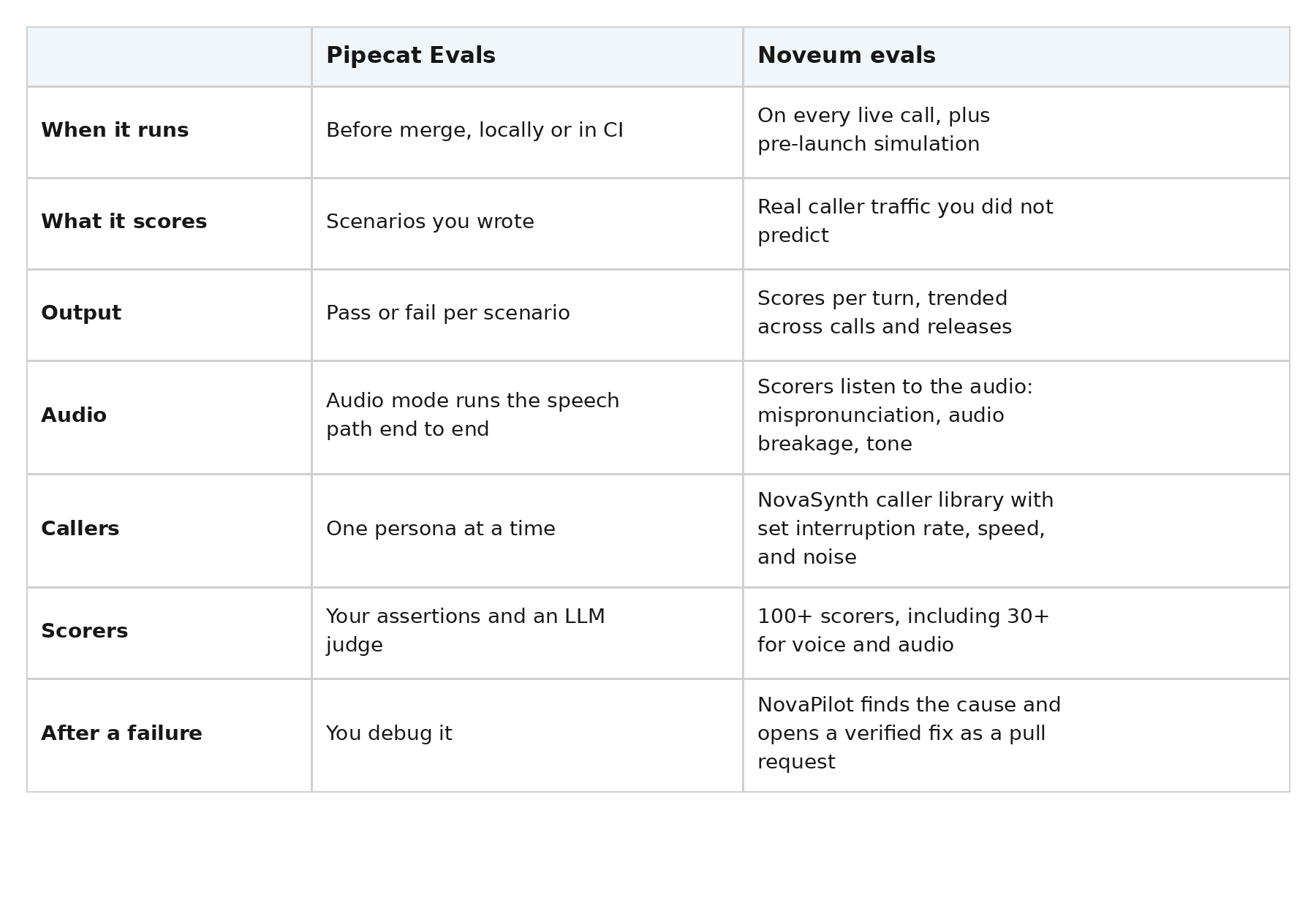
Keep your Pipecat Evals in CI. Use Noveum to catch what they cannot see. Then turn each new production failure into a new Pipecat scenario, which is the loop Pipecat itself recommends.
What Does Noveum Trace That Pipecat's OpenTelemetry Doesn't?
Noveum records the audio. Pipecat's OpenTelemetry spans carry text, timing, and token counts. They do not carry the sound of the call. That matters because most voice failures are things you have to hear.
Noveum captures an audio clip for every STT span and every TTS span, plus the complete audio for the whole call. OpenTelemetry spans hold attributes, not audio files, so this is not something you can get from OTel alone. Here is what the Noveum tracer adds on top of Pipecat's built-in tracing:
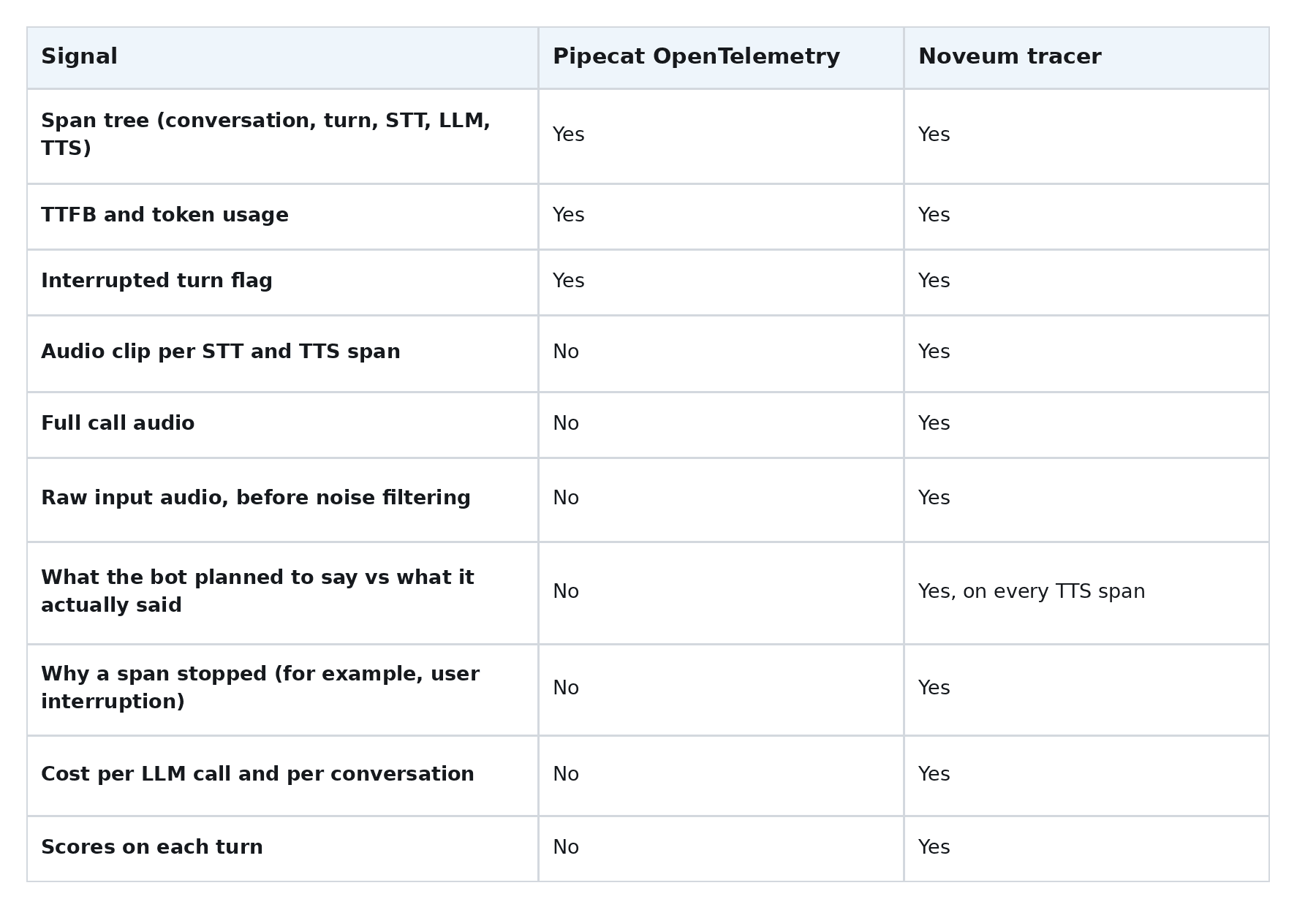
Already sending custom OpenTelemetry spans? The tracer folds them into the same Noveum trace, nested under the active turn. You do not have to rip anything out.
How Do You Add Noveum to a Pipecat Pipeline?
You add a few lines to your existing pipeline. Most teams get a first trace in under 15 minutes. You need Python 3.11 or later and a Pipecat 1.x pipeline.
Step 1: Install the SDK.
pip install "noveum-trace[pipecat]"Step 2: Add the tracer to your bot. You add the Noveum imports, one noveum_trace.init call at startup, and three tracer lines in run_call. Everything else is code you already have.
import os

import noveum_trace
from noveum_trace.integrations.pipecat import NoveumPipecatTracer

noveum_trace.init(
    api_key=os.environ["NOVEUM_API_KEY"],
    project=os.environ["NOVEUM_PROJECT"],
    service_version=os.environ["NOVEUM_SERVICE_VERSION"],
)


async def run_call(pipeline, transport):
    tracer = NoveumPipecatTracer()
    pipeline = tracer.observe_pipeline(pipeline)
    task = PipelineTask(pipeline, params=PipelineParams(...))
    task = await tracer.register_task_handlers(task, transport=transport)
    await PipelineRunner().run(task)
That is it. The defaults do the rest. Audio recording is on. Pipecat's metrics and usage metrics are switched on for you if they are off. Set service_version on every deploy so you can compare scores between releases.
What gets traced?
Each call becomes one trace. Inside it, you get one span per turn, with child spans for STT, LLM, and TTS. You also get tool calls and results, token usage, latency, errors, interruption state, and audio.
pipecat.conversation          one call, with full call audio
├── pipecat.turn (turn 1)     one user and bot exchange
│   ├── pipecat.stt           with the caller's audio clip
│   ├── pipecat.llm
│   └── pipecat.tts           with the bot's audio clip
└── pipecat.turn (turn 2)
    └── ...
Why Are Interruptions So Hard to Evaluate in Pipecat?
Interruptions are hard to evaluate because Pipecat cleans up after them. When a caller cuts in, the evidence of what went wrong disappears from the transcript.
Here is what Pipecat does when a user barges in. It sends an InterruptionFrame through the pipeline. The LLM stops mid-stream. TTS clears its buffers. The transport throws away audio that was generated but not yet played.
Then comes the part that matters for evaluation. Only the words the bot actually spoke go into the context. Pipecat commits "the partial, spoken-so-far text" as the assistant message. That is the right design for the conversation. But it means the transcript reads cleanly even when the turn was a mess.
Which interruption failures should you watch for?
Four patterns cause most of the pain:
- The bot talks over the caller. The end-of-turn setting is too tight, so the bot replies while the caller is still thinking.
- The bot stops for nothing. A cough, background noise, or an "uh-huh" triggers an interruption. Pipecat offers fixes, like a minimum word count or a model that filters backchannels. You still need to know how often it happens.
- The bot is slow to stop. The caller cuts in, but audio keeps playing.
- The bot loses its place. After being cut off, it repeats itself or skips the step it was on.
The first two look identical in a transcript and have opposite fixes. If the bot cut in, you widen the end-of-turn threshold. If the caller cut in, you look at why the bot's answer ran long.
The cost is real. In one production voice deployment we audited, turn detection gaps were too tight. The bot kept asking "are you there?" while callers were mid-sentence. Instruction adherence failed on 86.1% of turns in that loop.
How does Noveum capture an interrupted turn?
The tracer listens for the same InterruptionFrame Pipecat uses. When it fires, the tracer closes the partial LLM and TTS spans with a termination reason of user_interruption and marks the turn as interrupted.
The TTS span then shows what the bot planned to say next to what it actually said. And because each STT and TTS span has its own audio clip, you can play the exact moment the caller cut in. That is the evidence the transcript throws away.
Which Scorers Should You Enable for Real-Time Voice?
Start with latency and turn-taking, then add quality and tools. You do not need every scorer on day one.
Turn-taking and interruptions:
AiInterruptUsercounts when the agent cuts into the caller.UserInterruptAgentcounts when the caller cuts into the agent.EndOfTurnDelaychecks how long the agent waits after the caller stops.TalkRatiocompares agent and caller speaking time.
Latency, per stage:
TranscriptionDelayandSttLatencyfor speech-to-text.LlmTtftfor the model's time to first token.TtsTtfbfor time to first byte of audio.E2eLatencyfor the full gap the caller feels.
Speech and audio quality:
WordAccuracyandSttEfficacyfor transcription.Mispronunciation,AudioBreakage, andToneClarityfor TTS.
Task and tools:
tool_correctnessandparameter_correctnesscheck the right tool got the right arguments.instruction_adherencechecks the agent followed its prompt.
See the full list on the Noveum scorers page. Noveum also suggests scorers based on the traces it actually captures.
What Do the Latency and Quality Dashboards Show?
The dashboards show where time and quality go on every call, turn by turn. You stop guessing which stage was slow.
Latency, split by stage. A 900-millisecond turn tells you nothing on its own. The trace splits it into STT time, model time to first token, and TTS time to first byte. Now you know which provider to swap or tune.
Calls ranked by failing scorer. Sort by any scorer and the worst calls rise to the top. Each one opens with the transcript, per-turn timing, and audio for every STT and TTS span, plus the full call.
Interrupted turns, flagged. Open any interrupted turn and compare what the bot meant to say with what it said before it stopped.
Cost per conversation. Each trace rolls up tokens and cost for the whole call, including reasoning and cached tokens where the provider reports them.
Release tags. Every trace carries the service_version you set at startup. That makes it easy to check if a new prompt, model, or TTS voice moved your scores.
How Do You Go From a Failing Score to a Fix?
Scores find the problem. You still have to fix it and prove the fix works.
NovaPilot reads the failing calls, groups them by cause, and generates a fix. It validates the fix two ways: a backtest on the failing calls and an end-to-end re-simulation. Then it opens a pull request your team reviews and merges.
If you also run LiveKit, the setup is similar. See our LiveKit voice agent evaluation guide.
Get Started
Pipecat gives you the pipeline and the raw signals. Production evaluation turns those signals into scores you can act on. Add the tracer, turn on the turn-taking and latency scorers first, and listen to your interrupted turns for a week. You will learn more about your agent than any local test can show you.
Start free with Noveum. No credit card. First trace in about 15 minutes.
FAQ
1. How do I detect when my Pipecat agent talks over callers?
Trace every turn and score it with AiInterruptUser and EndOfTurnDelay. Then sort calls by those scorers and play the audio on the worst ones. Start free with Noveum, no credit card needed, and get your first Pipecat trace in about 15 minutes.
2. How are Noveum evals different from Pipecat Evals?
Pipecat Evals run scripted or simulated tests before you ship and return pass or fail. Noveum scores every live call, including the audio, and trends those scores across releases. Use Pipecat Evals in CI and Noveum in production.
3. What does Noveum trace that Pipecat's OpenTelemetry does not?
Noveum captures an audio clip for every STT and TTS span, plus full call audio. It also records what the bot planned to say vs what it said, why a span stopped, and cost per call.
4. Do I need to change my Pipecat metrics settings?
The tracer turns on Pipecat's metrics and usage metrics for you if they are off. Your existing custom OpenTelemetry spans are folded into the same trace.
5. Is the Noveum Pipecat integration open source?
Yes. The noveum-trace SDK is open source under Apache-2.0, and the Pipecat integration lives in the public repo. You can read exactly what it records before you ship it.
Get Early Access to Noveum.ai Platform
Join the select group of AI teams optimizing their models with our data-driven platform. We're onboarding users in limited batches to ensure a premium experience.