
LiveKit Voice Agent Evaluation: Score Quality & Latency

Harkirat Singh
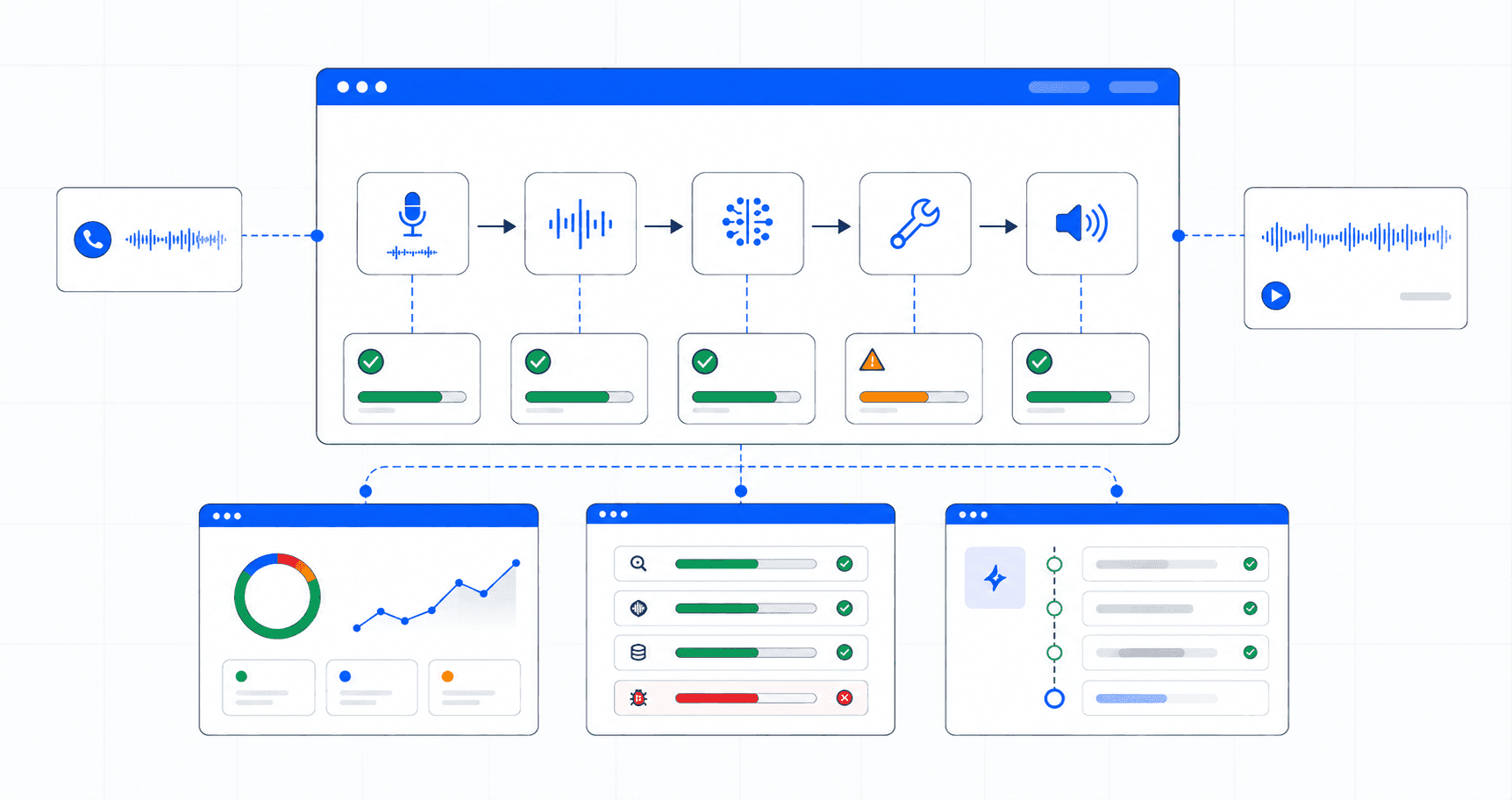
A LiveKit voice agent can pass every test on your machine and still stumble on the calls that count. The transcript reads correctly, yet the voice clips a word, mangles a customer’s name, or lands a beat too late. A log will not flag any of that. The customer will.
LiveKit gives you the runtime to build the agent. It owns the real-time media layer and the loop that strings together speech recognition, the model, tools, and speech output.
What it does not give you is a verdict on each call. Judging whether the answer was right, the voice was clear, and the timing felt natural is a separate job. That job is what this guide is about.
Noveum handles it. Once a LiveKit agent is connected, it scores every conversation against 100+ evaluators, including 30+ dedicated voice and audio scorers.
It then turns the failures it finds into fixes your engineers can merge. The sections below cover the whole loop: connecting the pipeline, what gets traced, which scorers to switch on, what the dashboard shows, and how NovaPilot reacts when quality slips.
What Is LiveKit Voice Agent Evaluation?
LiveKit voice agent evaluation means scoring a live voice agent on three things: quality, latency, and reliability. Quality covers what it says. Latency covers how fast each turn is. Reliability covers whether the audio and tool calls behind the call hold up.
It goes past logging. Evaluation puts a score on every conversation, so a good call can be told from a bad one at scale, not one replay at a time.
LiveKit provides the runtime. It owns the WebRTC media layer, the agent loop, and the orchestration of speech-to-text (STT), the language model (LLM), and text-to-speech (TTS).
It does not judge whether the answer was correct, whether the voice was clear, or whether the agent interrupted the caller. That scoring layer is the job of an evaluation platform.
Why Is Evaluating a LiveKit Agent Hard at Scale?
A handful of test calls are easy to check by ear. A few thousand a day are not, and the failures that hurt most are the ones a quick listen would miss.
Four problems show up again and again once a LiveKit agent carries real traffic.
-
Patterns hide across calls. LiveKit’s session view is built to inspect one call at a time. Spotting a trend across thousands of them takes scoring, not scrolling.
-
The worst failures are silent. Garbled audio, a clipped word, or a mispronounced name never appears in a transcript. The text can read perfectly while the call sounds broken.
-
Latency blurs together. A slow turn could come from STT, the model, TTS, or a tool call. An average response time tells you the turn was slow, not which stage to fix.
-
“It ran” is not “it was good.” Confirming the agent executed is a different question from confirming it handled the caller well. Only the second one keeps customers.
Left unscored, the customer becomes the monitoring layer, and you learn about a bad call when someone complains. Noveum closes that gap by scoring every conversation automatically and pointing to where and why a call went wrong.
What Does LiveKit Give You Out of the Box?
It is worth being clear about what LiveKit already handles well. Its native Agent Observability puts transcripts, traces, logs, and audio recordings in one place, and breaks each session into spans for every pipeline stage.
The SDK also emits real per-turn metrics. These include end-to-end latency, LLM time to first token, and TTS time to first byte, plus metric types for STT, VAD, and end-of-utterance detection. (
For media-layer debugging, this is solid.
Two limits matter for teams running at scale. First, LiveKit Agent Observability is only available for LiveKit Cloud projects and does not work with fully self-hosted media servers.
Second, none of it scores call quality. It might report that a turn took 900 milliseconds, for example. It does not report that the answer was wrong, the name was mispronounced, or the agent talked over the customer.
This is where evaluation begins. LiveKit measures the pipeline. Noveum scores the conversation.
How Do You Connect a LiveKit Pipeline to Noveum?
Integration is deliberately non-intrusive. You wrap your existing STT and TTS providers with Noveum trace wrappers and start session tracing. No rewrite of your agent logic is required.
The steps below use the drive-thru order taker that Noveum ships in its docs. Follow them in order.
Step 1: Install the packages
Install the Noveum tracing SDK alongside LiveKit Agents and your provider plugins.
pip install noveum-trace livekit livekit-agents
pip install livekit-plugins-deepgram livekit-plugins-cartesia livekit-plugins-openai
Step 2: Set your environment variables
Add the keys for Noveum and each provider in your pipeline, plus your LiveKit server URL.
export NOVEUM_API_KEY="your-noveum-api-key"
export DEEPGRAM_API_KEY="your-deepgram-api-key"
export CARTESIA_API_KEY="your-cartesia-api-key"
export OPENAI_API_KEY="your-openai-api-key"
export LIVEKIT_URL="your-livekit-url"
Step 3: Initialize Noveum Trace
Import the LiveKit wrappers and call noveum_trace.init once, near the top of your agent file. This connects the SDK to your project.
import os

import noveum_trace
from livekit.agents import Agent, AgentSession, JobContext, function_tool
from livekit.plugins import cartesia, deepgram, openai
from noveum_trace.integrations.livekit import (
    LiveKitSTTWrapper,
    LiveKitTTSWrapper,
    extract_job_context,
    setup_livekit_tracing,
)

noveum_trace.init(
    project="drive-thru-agent",
    api_key=os.environ["NOVEUM_API_KEY"],
    environment="production",
)
Step 4: Define your agent and its tools
This is your existing LiveKit code. Nothing here changes for tracing.
@function_tool
async def add_item_to_order(item: str, quantity: int = 1) -> str:
    """Add an item to the customer's order."""
    return f"Added {quantity}x {item} to your order"


class DriveThruAgent(Agent):
    def __init__(self) -> None:
        super().__init__(
            instructions="You are a friendly drive-thru order taker...",
            tools=[add_item_to_order],
        )
Step 5: Wrap your STT and TTS providers
Create the session with wrapped providers. extract_job_context pulls the room, participant, and job metadata so every trace is tagged.
async def create_session(ctx: JobContext) -> AgentSession:
    session_id = ctx.job.id
    job_context = await extract_job_context(ctx)

    traced_stt = LiveKitSTTWrapper(
        stt=deepgram.STT(model="nova-3", language="en-US"),
        session_id=session_id,
        job_context=job_context,
    )

    traced_tts = LiveKitTTSWrapper(
        tts=cartesia.TTS(model="sonic-3", voice="friendly-voice-id"),
        session_id=session_id,
        job_context=job_context,
    )

    return AgentSession(
        stt=traced_stt,
        llm=openai.LLM(model="gpt-4o-mini"),
        tts=traced_tts,
    )
Step 6: Start session tracing and launch
Call setup_livekit_tracing on the session, then start the agent as usual. From here, every session, turn, and tool call is captured automatically.
async def entrypoint(ctx: JobContext) -> None:
    session = await create_session(ctx)
    setup_livekit_tracing(session)
    await session.start(agent=DriveThruAgent(), room=ctx.room)
That is the full integration. Four components do the work: LiveKitSTTWrapper and LiveKitTTSWrapper trace the audio legs, setup_livekit_tracing captures the session and tool calls, and extract_job_context tags every trace.
Because the wrappers sit around the real providers, the agent behaves exactly as before. Most teams have this running in about 15 minutes, and traces appear in the dashboard in real time. (Source: Noveum pricing)
What Gets Instrumented and Traced
Once the wrappers are live, every turn produces a structured span tree.
livekit.session
├── livekit.stt → stt.vad_to_final_ms, stt.first_text_latency_ms,
│                  stt.confidence, stt.model, audio recording
├── livekit.llm → llm.time_to_first_token_ms, tokens, cost,
│                  llm.function_calls[]
└── livekit.tts → tts.time_to_first_byte_ms, tts.characters,
                   tts.voice, generated audio recording
For teams that already read LiveKit’s own numbers, the metrics line up. LiveKit’s SDK emits time to first token and time to first byte on every turn.
Noveum records the same signals as llm.time_to_first_token_ms and tts.time_to_first_byte_ms. It also adds stt.vad_to_final_ms, so you can see how long turn detection and transcription took before the model even started.
The result is a per-stage latency breakdown attached to a scored, playable call rather than a raw log line. Noveum also stores the audio itself. STT input recordings and TTS output recordings are playable in the dashboard, next to the exact transcript and the synthesis text.
When a score looks off, teams can press play and hear the failure instead of guessing at it.
Voice-Specific Scorers for Quality, Latency, and Reliability
Once traces are captured, Noveum evaluates each conversation automatically. The starting point for voice agents is Noveum’s set of 30+ dedicated voice and audio scorers, which most tools skip.
They cover TTS and audio quality, voice pipeline latency, speaking-over-user detection, mispronunciation detection, and audio breakage detection. These are the signals that matter for a spoken interaction rather than a text one.
They map cleanly to the three pillars in the title.
-
Quality. TTS quality scores whether the synthesized voice is clear and natural. Mispronunciation detection catches names, product terms, and numbers said wrong. Conversational scorers for role adherence and clarity confirm the agent stayed in character.
-
Latency. Voice pipeline latency draws on the per-stage timings above. Slice by stt.vad_to_final_ms, llm.time_to_first_token_ms, and tts.time_to_first_byte_ms to find the slow leg. LiveKit says model choice and co-location are the biggest levers, so the dominant stage points straight at the fix. (Source: LiveKit)
-
Reliability. Audio breakage detection flags calls where the audio cut out or garbled. Speaking-over-user detection catches barge-in failures. Tool correctness confirms the agent called add_item_to_order with the right arguments.
This is the line between functional testing and quality evaluation. A functional test confirms the agent ran. These scorers confirm whether it was good, and they run on every trace rather than a sample.
The Dashboard Once It Is Running
With traces flowing, the Noveum dashboard opens on the Traces view. Each LiveKit session shows the full conversation flow: STT transcriptions with their audio, the LLM calls, tool executions, and TTS generations.
Opening a span reveals the detail. Teams can play the actual input and output audio, read the transcript, check transcription confidence, and review per-turn timing.
The Metrics view rolls this up across every call: session duration, turn-by-turn timing, audio quality scores, and cost per operation. Because extract_job_context tagged each trace, calls can be filtered by room, participant, or job.
Instead of scrolling through events, teams sort by a failing scorer and pull up every call that mispronounced a name or broke audio, ranked and playable. The bad call surfaces before it turns into a support ticket.
Catching Quality Degradation with NovaPilot
Detection is only part of the job. The harder part is knowing what to change, and shipping it safely. NovaPilot monitors scored traces continuously. Say TTS quality drops after a voice-model swap, or tool correctness falls after a prompt change.
NovaPilot isolates the root cause and validates a fix against the calls that actually failed.
The fix arrives as a pull request, backtested on the failing traces and re-simulated end to end. Your engineers review and merge it through their normal process.
Most tools hand teams a log and leave the diagnosis to them. NovaPilot delivers a change that has already been checked against real failures.
It does not remove engineering judgment, since the pull request still goes through review. It removes the hours usually spent reconstructing what went wrong before that review can start.
Testing Before Production with NovaSynth
Failures do not have to wait for real traffic to appear. NovaSynth runs synthetic callers against a LiveKit agent. NovaSynth joins the LiveKit room as a participant and holds a real voice conversation with the agent, driven by a persona and a scenario.
A persona carries a goal, a patience level, a tone, and a language. That lets you run an impatient expert and a confused first-timer against the same agent.
Because it delivers real audio into the room, barge-in, turn detection, and interruption handling behave as they would with a real caller. The existing trace wrappers capture every span, tagged source: synthetic, and Noveum scores the runs.
A useful practice is to re-run the same persona and scenario matrix after every model swap or prompt change. If the new build fails more scenarios than the last one, it is not ready.
NovaSynth synthetic voice testing is currently in private beta, available on request at support@noveum.ai.
Conclusion
Operating a LiveKit voice agent in production takes more than a working pipeline. Teams also need to know whether real conversations are good, where latency is coming from, and which calls broke, then fix them quickly.
Noveum supports that full workflow:
- Non-intrusive tracing of STT, LLM, and TTS through simple wrappers
- 30+ dedicated voice and audio scorers for quality, latency, and reliability, running on every call
- A dashboard with playable audio, per-stage latency, and filterable traces
- NovaPilot fixes delivered as backtested pull requests
- NovaSynth synthetic callers for testing before production
LiveKit measures the pipeline. Noveum scores the conversation and helps fix it. As voice agents move further into production, that difference is what keeps them trustworthy at scale.
Get Started
Noveum’s free plan includes 2,500 credits a month with no credit card. That is enough to trace and score a live LiveKit agent and see your first results in about 15 minutes.
Start free, or book a demo to see it run on your own agent.
FAQ
1. How do you know if a LiveKit agent is talking over customers?
Enable Noveum’s speaking-over-user detection scorer. Once the STT and TTS providers are wrapped and setup_livekit_tracing is called, every turn is scored. Barge-in failures surface in the dashboard, ranked and playable, so you can hear where the agent cut in.
2. Does Noveum replace LiveKit’s built-in observability?
No. It sits on top. LiveKit Agent Observability covers only LiveKit Cloud projects and does not score call quality. (Noveum captures everything from inside your agent's own code, so it never depends on LiveKit Cloud. It works the same whether your agent connects to LiveKit Cloud or to a self-hosted LiveKit server.
3. What is the difference between functional testing and quality evaluation?
Functional testing confirms the agent works: it ran, the tool fired. Quality evaluation confirms the agent was good: the voice was clear, the answer was right, it did not interrupt. Noveum focuses on the second and adds the fix.
4. Which voice metrics matter most for reliability?
Start with audio breakage detection, speaking-over-user detection, and tool correctness. These catch the failures that make a call unusable even when the transcript looks fine. Layer voice pipeline latency on top to see which stage is slowing the turn.
5. How long does the integration take?
Most teams are tracing in about 15 minutes. Install noveum-trace, wrap the STT and TTS providers, and call setup_livekit_tracing, with no change to agent logic. See the LiveKit integration overview, or book a demo.
Get Early Access to Noveum.ai Platform
Join the select group of AI teams optimizing their models with our data-driven platform. We're onboarding users in limited batches to ensure a premium experience.