
Observability conceptsSpans - Individual Operations
Spans - Individual Operations
Understanding spans and how they represent individual operations within traces
A span represents a single operation within a trace. It's the building block that makes up the complete request journey. Each span has a start time, end time, and can contain child spans, creating a hierarchical structure.
🎯 What is a Span?
A span represents:
- A single function call or method execution
- An LLM API call to a specific model
- A database query or external API call
- A business logic operation like data processing
- A tool execution in an agent workflow
🏗️ Span Structure
Every span contains:
- Span ID: Unique identifier within the trace
- Trace ID: Reference to the trace it belongs to
- Name: Descriptive name of the operation
- Start/End Time: When the operation began and completed
- Duration: How long the operation took
- Status: Success, error, or other completion state
- Attributes: Key-value metadata
- Events: Point-in-time occurrences
- Child Spans: Nested operations
📊 Visual Hierarchy
Here's how spans form a hierarchical structure:
customer-support-query (trace id: trace_12345)
├── classify-query (span)
├── gpt-4-completion (span)
│   ├── openai-api-call (child span)
│   └── token-counting (child span)
└── log-interaction (span)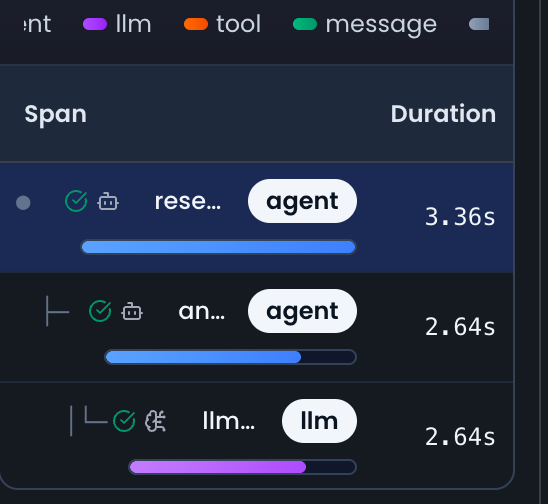
🔄 Span Lifecycle
1. Span Creation
from noveum_trace import trace_operation, trace_llm_call

# Create a span
with trace_operation("classify-query") as span:
    # Operation logic here
    pass
2. Add Attributes
with trace_operation("classify-query") as span:
    span.set_attributes({
        "query.length": len(query),
        "query.language": "en",
        "classification.confidence": 0.85
    })

    # Your operation logic
    result = classify_query(query)
3. Add Events
with trace_operation("classify-query") as span:
    span.add_event("classification.started", {
        "timestamp": time.time(),
        "query.preview": query[:50]
    })

    result = classify_query(query)

    span.add_event("classification.completed", {
        "result": result,
        "confidence": 0.85
    })
4. Set Status
with trace_operation("classify-query") as span:
    try:
        result = classify_query(query)
        span.set_status("ok")
        return result
    except Exception as e:
        span.set_status("error", str(e))
        raise
🎯 Span Types in AI Applications
LLM Spans
# Trace LLM calls
with trace_llm_call(model="gpt-4", provider="openai") as span:
    response = openai.chat.completions.create(
        model="gpt-4",
        messages=[{"role": "user", "content": "Hello"}]
    )

    # Set usage attributes
    span.set_attributes({
        "llm.input_tokens": response.usage.prompt_tokens,
        "llm.output_tokens": response.usage.completion_tokens,
    })
Agent Spans
from noveum_trace import trace_agent_operation

# Trace agent operations
with trace_agent_operation(agent_type="researcher", agent_id="researcher_001") as span:
    span.set_attributes({
        "agent.capabilities": "web_search,analysis",
        "agent.task": "research_topic",
        "agent.input": topic
    })

    result = research_agent.analyze(topic)

    span.set_attributes({
        "agent.output": result,
        "agent.confidence": result.confidence
    })
Tool Spans
from noveum_trace import trace_operation

# Trace tool executions
with trace_operation("web_search", {"tool.type": "api"}) as span:
    span.set_attributes({
        "tool.input.query": query,
        "tool.input.max_results": 10
    })

    results = web_search_tool.search(query)

    span.set_attributes({
        "tool.output.results_count": len(results),
        "tool.output.success": True
    })
Custom Operation Spans
# Trace custom business logic
with trace_operation("process-customer-data") as span:
    span.set_attributes({
        "customer.id": customer_id,
        "data.records_count": len(records),
        "processing.batch_size": 100
    })

    processed_data = process_customer_data(records)

    span.set_attributes({
        "processing.results_count": len(processed_data),
        "processing.success_rate": 0.95
    })
📈 Span Attributes
System Attributes
span.set_attributes({
    "span.id": "span_12345",
    "span.name": "gpt-4-completion",
    "span.duration_ms": 1800,
    "span.status": "ok",
    "span.start_time": "2024-01-15T10:30:00Z"
})
AI-Specific Attributes
span.set_attributes({
    "ai.model": "gpt-4",
    "ai.provider": "openai",
    "ai.temperature": 0.7,
    "ai.max_tokens": 1000,
    "ai.prompt_tokens": 150,
    "ai.completion_tokens": 200,
    "ai.total_tokens": 350,
    "ai.cost_usd": 0.0023
})
Business Attributes
span.set_attributes({
    "business.operation": "customer_support",
    "business.priority": "high",
    "business.customer_tier": "premium",
    "business.region": "us-west",
    "business.feature": "chatbot"
})
🎪 Span Events
Operation Events
# Start and completion events
span.add_event("operation.started", {
    "timestamp": time.time(),
    "input.size": len(input_data)
})

span.add_event("operation.completed", {
    "timestamp": time.time(),
    "output.size": len(output_data),
    "success": True
})
AI Events
# Model selection and response events
span.add_event("ai.model.selected", {
    "model": "gpt-4",
    "reason": "complex_query",
    "fallback_used": False
})

span.add_event("ai.response.generated", {
    "tokens_used": 200,
    "finish_reason": "stop",
    "response_time_ms": 1800
})
Error Events
# Error tracking
span.add_event("error.occurred", {
    "error.type": "APIError",
    "error.message": "Rate limit exceeded",
    "error.retry_count": 3,
    "error.retry_after": 60
})
🔍 Span Analysis
Performance Metrics
- Duration: How long the operation took
- Latency: Time spent waiting for external services
- Throughput: Operations per second
- Resource Usage: CPU, memory, network usage
Error Analysis
- Error Rate: Percentage of failed operations
- Error Types: Common failure patterns
- Retry Patterns: How often operations are retried
- Recovery Time: Time to recover from errors
Cost Analysis
- Token Usage: Input and output tokens
- API Costs: Cost per operation
- Resource Costs: Infrastructure costs
- Total Cost: End-to-end operation cost
🔗 Parent-Child Relationships
Creating Child Spans
with trace_operation("parent-operation") as parent_span:
    # Child span 1
    with trace_operation("child-operation-1") as child1_span:
        result1 = operation_1()

    # Child span 2
    with trace_operation("child-operation-2") as child2_span:
        result2 = operation_2()

    # Parent span can access child results
    parent_span.set_attributes({
        "child1.result": result1,
        "child2.result": result2
    })
Span Context
# Spans automatically inherit context from parents
with trace_operation("customer-query") as parent_span:
    parent_span.set_attributes({
        "customer.id": "cust_123",
        "query.type": "support"
    })

    # Child spans inherit customer context
    with trace_operation("classify-query") as child_span:
        # This span automatically has customer.id and query.type
        classification = classify_query(query)
🚀 Next Steps
Now that you understand spans, explore these related concepts:
- Traces - Complete request journeys
- Attributes - Metadata and context
- Events - Point-in-time occurrences
Best Practices
- Spans Best Practices - Learn how to create effective spans
Spans are the building blocks of observability. They provide detailed insights into individual operations, making it easy to understand performance, debug issues, and optimize your AI applications.