
Why Your AI Agents Are Hallucinating (And How to Stop It)

Shashank Agarwal
Your new AI customer service agent just confidently told a user that your product is compatible with a competitor's—when it isn't. Your research agent just cited a non-existent academic paper in its summary. Your internal knowledge base agent just invented a company policy that doesn't exist.
These are not just bugs; they are AI hallucinations. And they are one of the most dangerous and insidious problems facing production AI agents today. They erode user trust, create compliance risks, and can cause direct financial damage.
This article explains why agents hallucinate and how you can automatically detect and prevent it before your customers do.
What is an AI Hallucination?
An AI hallucination occurs when a large language model (LLM) generates information that is plausible but factually incorrect, irrelevant, or nonsensical in the given context. It's not a bug in the traditional sense—the model is functioning as designed, but its internal patterns have led it to an incorrect conclusion which it presents with complete confidence.
For AI agents, which are often designed to take action based on information, hallucinations are particularly dangerous. An agent that hallucinates can:
- Call the wrong tool with incorrect parameters
- Provide false information to a user
- Make a critical business decision based on flawed data
- Cite non-existent sources or policies
- Confidently contradict your actual documentation
The Dangerous Part: Unlike traditional software bugs that crash or throw errors, hallucinations appear as normal, confident responses. There's no error message—just wrong information delivered with certainty.
Why Do AI Agents Hallucinate?
There are several root causes for agent hallucinations, but they often fall into a few key categories:
1. Lack of Groundedness
The agent generates information that is not supported by the context it was given. This is the most common cause of hallucinations in Retrieval-Augmented Generation (RAG) systems.
Example: A customer asks about your return policy. The RAG system retrieves a document about shipping policies instead. The agent "fills in the gaps" by inventing a plausible-sounding return policy.
2. Faulty Reasoning
The agent makes a logical leap that is incorrect, leading it to a false conclusion. Even with correct information, the model's reasoning process can go astray.
Example: An agent is told "Product A costs 150." When asked which is cheaper, it might occasionally claim Product B is cheaper due to reasoning errors.
3. Outdated Knowledge
The model's training data is old, and it provides information that is no longer accurate. This is especially problematic for rapidly changing domains.
Example: An agent trained on 2023 data confidently states a library version that has since been deprecated and replaced.
4. Ambiguous Prompts
The user's prompt is unclear, and the agent makes an incorrect assumption to fill in the gaps rather than asking for clarification.
Example: A user asks "What's the price?" without specifying which product. The agent picks one arbitrarily and states its price confidently.
5. Context Window Limitations
Long conversations or documents can exceed the model's context window, causing it to "forget" or misremember earlier information.
6. Training Data Contamination
The model may have learned incorrect patterns from its training data, leading to systematic hallucinations on certain topics.
The High Cost of Doing Nothing
Ignoring hallucinations is not an option. The consequences can be severe:
| Risk Category | Consequences |
|---|---|
| User Trust | Once a user catches an agent in a lie, they stop trusting it. For customer-facing agents, this can be fatal to adoption. |
| Brand Damage | Public-facing agents that provide false information lead to negative press and social media backlash. |
| Compliance & Legal | In regulated industries like finance and healthcare, providing false information can have serious legal consequences and fines. |
| Financial Loss | Wrong pricing, incorrect product info, or bad recommendations can directly impact revenue. |
| Operational Chaos | Internal agents that hallucinate can cause employees to make decisions based on false information. |
Real-World Hallucination Disasters
- Legal: A lawyer used ChatGPT to cite cases in a court filing—the cases didn't exist.
- Healthcare: AI systems have been shown to generate plausible but completely fabricated medical advice.
- Customer Service: Agents have promised discounts, features, or policies that don't exist, creating support nightmares.
- Research: Academic AI tools have cited non-existent papers with fabricated authors and titles.
How to Detect Hallucinations Automatically: The Noveum.ai Approach
Traditional methods for detecting hallucinations rely on manual review and fact-checking, which are slow, expensive, and reactive. You find out about a hallucination after it has already happened—often from an angry customer.
Noveum.ai offers a radically different approach: automated, real-time hallucination detection using the agent's own system prompt and context as the ground truth.
Key Hallucination Detection Scorers
Our platform uses a suite of 68+ specialized evaluation scorers to analyze every single agent response. Here are the key scorers for hallucination detection:
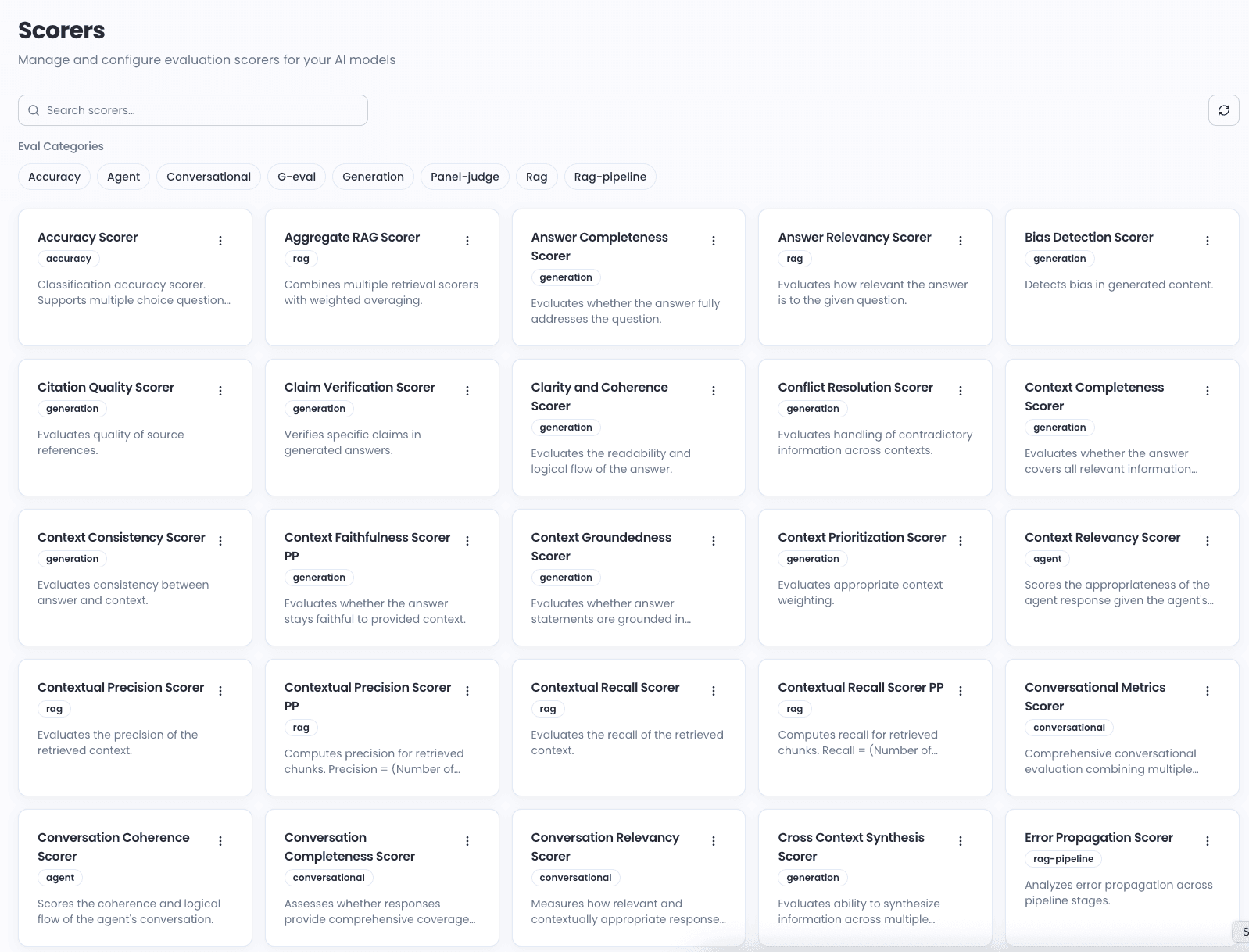
Faithfulness Scorer
The faithfulness_scorer checks if the agent's answer is factually consistent with the retrieved context. It directly measures whether the agent is "making things up." When a response contradicts the provided documents, it gets flagged with detailed reasoning explaining the inconsistency.
Groundedness Scorer
The groundedness_scorer evaluates whether the agent's responses are based on the provided context or conversation history. It penalizes the model for inventing information not supported by the facts at hand—like citing studies, statistics, or sources that don't exist in the context.
Additional Hallucination-Related Scorers
| Scorer | What It Detects |
|---|---|
claim_verification_scorer | Verifies individual claims against source documents |
context_relevance_scorer | Checks if retrieved context is relevant to the query |
answer_relevance_scorer | Ensures the answer addresses the actual question |
factual_accuracy_scorer | Cross-references statements against known facts |
source_attribution_scorer | Validates that citations and references exist |
The Power of System Prompt as Ground Truth
Instead of requiring a manually labeled dataset of "correct" answers, Noveum.ai uses the agent's system prompt and the context it was given as the source of truth.
The evaluation engine automatically checks:
- ✅ Did the agent's response contradict the provided documents?
- ✅ Did the agent invent information that wasn't in the context?
- ✅ Did the agent stay true to the facts it was given?
- ✅ Did the agent follow its role and instructions?
This allows for fully automated, real-time evaluation without the bottleneck of manual labeling.
How It Works
┌─────────────────────────────────────────────────────────────┐
│                    Agent Interaction                         │
├─────────────────────────────────────────────────────────────┤
│  User Query: "What's your return policy?"                   │
│                                                              │
│  Retrieved Context: "14-day return window for all items"    │
│                                                              │
│  Agent Response: "We offer a 30-day money-back guarantee"   │
│                           ↓                                  │
│                    ⚠️ HALLUCINATION                          │
└─────────────────────────────────────────────────────────────┘
                            │
                            ▼
┌─────────────────────────────────────────────────────────────┐
│                  Noveum.ai Evaluation                        │
├─────────────────────────────────────────────────────────────┤
│  Faithfulness Score: 2/10 ❌                                 │
│  Reason: Response contradicts retrieved context              │
│                                                              │
│  Groundedness Score: 3/10 ❌                                 │
│  Reason: "30-day" and "money-back guarantee" not in context │
│                                                              │
│  → Flagged for review and root cause analysis               │
└─────────────────────────────────────────────────────────────┘
From Detection to Diagnosis with NovaPilot
Detecting a hallucination is the first step. Understanding why it happened is the key to preventing it. This is where NovaPilot, our AI-powered root cause analysis engine, comes in.
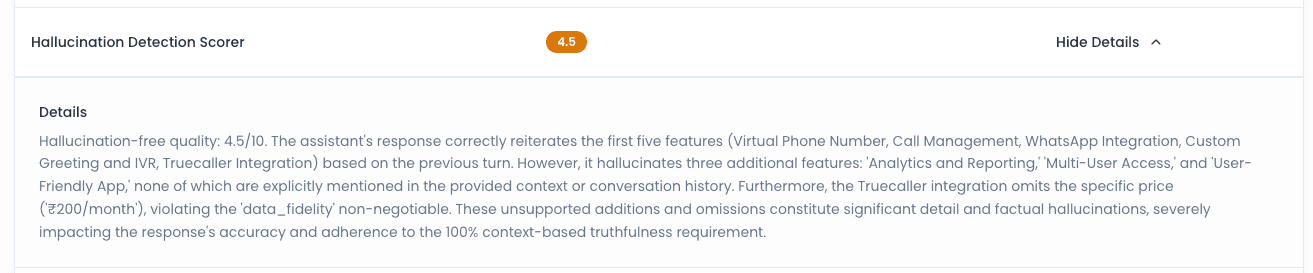
When a hallucination is detected, NovaPilot analyzes the entire agent trace and the scores from all 68+ evaluators to identify the root cause. It might find that:
Common Root Causes NovaPilot Identifies
Poor Retrieval Quality — Low context_relevance score indicates the RAG system retrieved wrong documents. The agent didn't have the right information to begin with.
Ambiguous System Prompt — The prompt doesn't explicitly instruct the agent to say "I don't know." Missing guardrails for handling uncertainty.
Model Tendency — Certain models are more prone to hallucination for specific task types. May need to switch models or add verification steps.
Context Window Issues — Important information was truncated due to token limits. Need to optimize context selection.
Missing Verification Steps — No fact-checking layer before response delivery. Consider adding a verification agent to the pipeline.
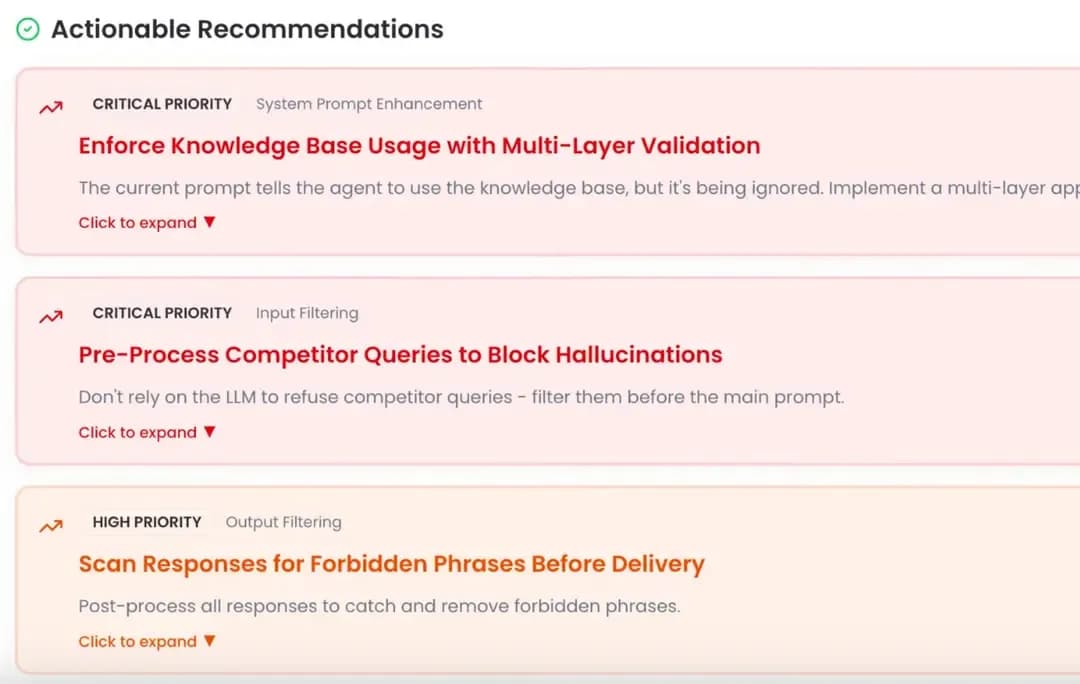
Actionable Fixes from NovaPilot
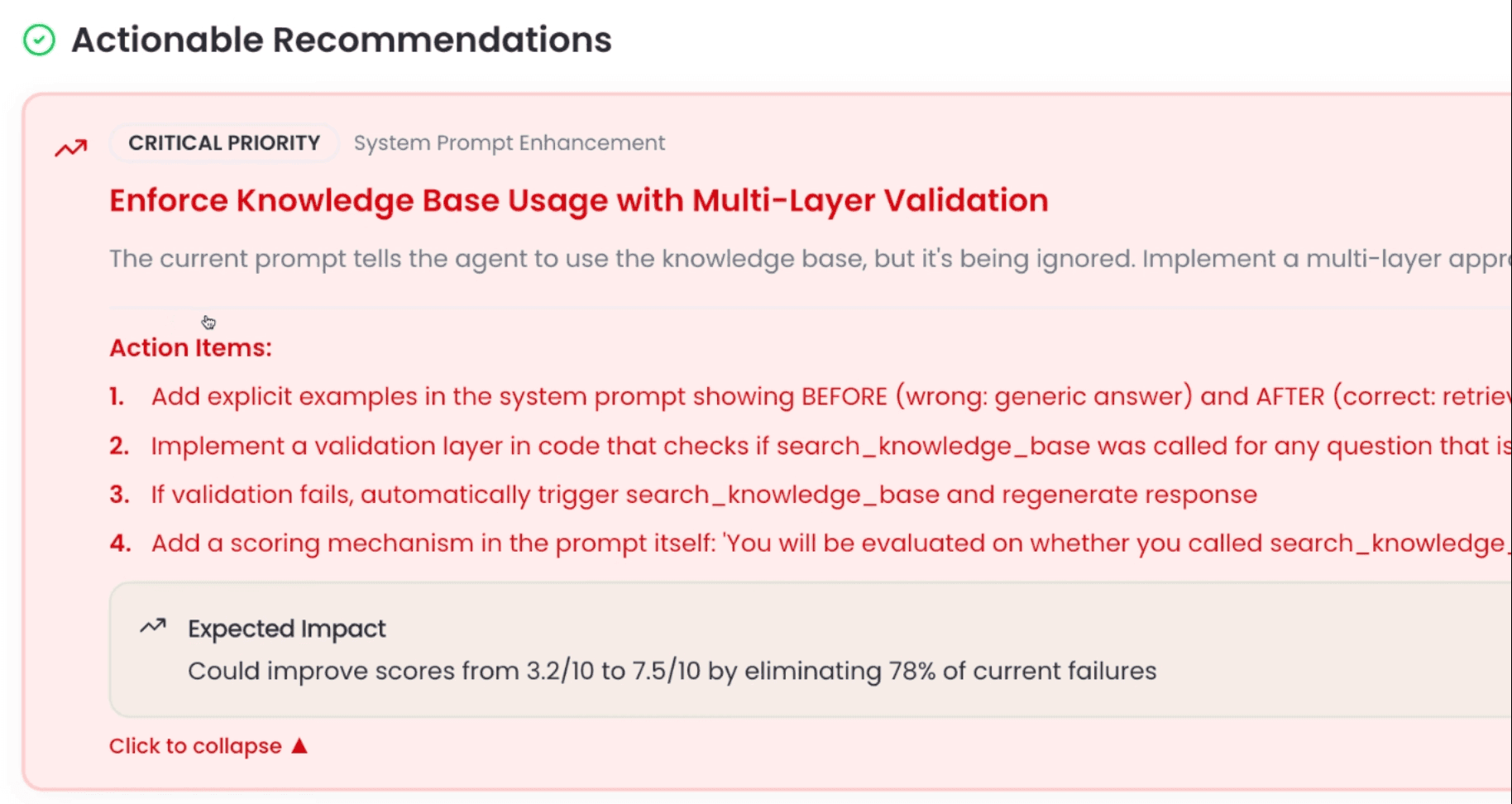
Based on its diagnosis, NovaPilot suggests specific, actionable fixes:
- "Add an instruction to the system prompt: 'If you're not certain about information, explicitly state that you need to verify it.'"
- "Improve the retrieval strategy to use semantic chunking for better context relevance."
- "Add a verification step that cross-references responses against the knowledge base before delivery."
- "Consider using a more grounded model like GPT-4 for this task type."
A Real-World Example: Financial Services Chatbot
Let's walk through a complete example of how Noveum.ai catches and diagnoses a hallucination:
The Scenario
A financial services chatbot is asked about the interest rate on a specific savings account. The RAG system retrieves a document about a similar but different account.
The Hallucination
The agent confidently states the interest rate from the wrong document:
User: "What's the interest rate on the Premium Savings Account?"
Agent: "The Premium Savings Account offers a 2.5% APY." ❌
(Actual rate: 3.2% APY — the agent cited the Standard Savings rate)
Noveum.ai Detection
The evaluation engine runs automatically on this interaction:
{
  "trace_id": "trace_abc123",
  "scores": {
    "answer_relevance": 9.2,
    "context_relevance": 4.1,
    "faithfulness": 3.5,
    "groundedness": 4.0
  },
  "flags": ["LOW_FAITHFULNESS", "CONTEXT_MISMATCH"],
  "severity": "HIGH"
}
NovaPilot Diagnosis
NovaPilot analyzes the trace and identifies the pattern:
- ✅ High
answer_relevancescore (9.2) — The answer is relevant to the question - ❌ Low
context_relevancescore (4.1) — The retrieved document was wrong - ❌ Low
faithfulnessscore (3.5) — Answer doesn't match retrieved context
Root Cause: The retrieval system, not the LLM. The wrong document was retrieved, so even a perfect LLM would give the wrong answer.
The Fix
NovaPilot recommends:
"Improve the retrieval system to be more precise. Consider using product-specific embeddings or adding metadata filtering to ensure the correct account type is retrieved. Current retrieval is matching on general 'savings account' terms rather than specific product names."
Implementing Hallucination Detection in Your Pipeline
Here's how to add hallucination detection to your existing agent:
Step 1: Add Tracing
from noveum_trace import (
    trace_agent_operation,
    trace_llm_call,
    trace_operation,
)


def handle_query(user_message: str) -> str:
    with trace_agent_operation(
        agent_type="customer_support",
        operation="handle_query",
    ):
        docs = retrieve_documents(user_message)
        return generate_response(user_message, docs)


def retrieve_documents(query: str) -> list:
    with trace_operation("knowledge_base_search") as span:
        span.set_attribute("retrieval.query", query)
        return vector_db.search(query, top_k=5)


def generate_response(query: str, context: list) -> str:
    with trace_llm_call(model="gpt-4o", provider="openai") as span:
        response = llm.complete(query, context)
        span.capture_response(response)
        return response
Step 2: Configure Evaluation in Dashboard
In your Noveum.ai dashboard, select the scorers you want to apply:
- Faithfulness Scorer — Detects contradictions with provided context
- Groundedness Scorer — Catches invented information
- Context Relevance Scorer — Monitors retrieval quality
- Answer Relevance Scorer — Ensures responses address the question
Set your thresholds (we recommend 7/10 for production) and configure your alert channels.
Step 3: Set Up Alerts
Configure real-time alerts for hallucination detection:
- Immediate: Slack/email for critical hallucinations (score < 5)
- Daily digest: Summary of all flagged responses
- Weekly report: Trends and patterns in hallucination rates
Best Practices for Preventing Hallucinations
1. Explicit Uncertainty Instructions
Add clear instructions to your system prompt:
When you don't have enough information to answer accurately:
- Say "I don't have that specific information"
- Offer to help find the right resource
- Never make up or guess at facts
2. Retrieval Quality Monitoring
Monitor your RAG pipeline's context relevance scores. Poor retrieval is the #1 cause of hallucinations.
3. Response Verification Layer
Add a verification step before delivering responses. Noveum.ai automatically evaluates every response against its context using our suite of 68+ scorers—no manual verification code needed. Simply enable hallucination detection in your dashboard and get instant alerts when responses don't match the provided context.
4. Continuous Monitoring
Hallucination patterns change over time. Monitor trends and adjust your prompts and retrieval strategies accordingly.
Frequently Asked Questions
How common are AI hallucinations?
Studies suggest that LLMs hallucinate between 3-27% of the time depending on the task and model. For RAG systems with poor retrieval, rates can be even higher.
Can hallucinations be completely eliminated?
No current technology can guarantee zero hallucinations. The goal is to detect them before they reach users and continuously reduce their frequency through better prompts, retrieval, and model selection.
What's the difference between faithfulness and groundedness?
Faithfulness measures whether the response contradicts the provided context. Groundedness measures whether claims are supported by the context at all. A response can be faithful (not contradicting) but not grounded (adding unsupported information).
How does Noveum.ai handle real-time detection?
Every trace is evaluated automatically as it's captured. Scores are computed in near-real-time, and alerts are triggered immediately when thresholds are crossed.
What models are most prone to hallucination?
Generally, smaller and faster models hallucinate more than larger ones. However, even GPT-4 hallucinates. The key is detection and mitigation, not model selection alone.
Conclusion
Hallucinations are a serious threat to the reliability and trustworthiness of AI agents. Relying on manual detection is a losing battle—you'll always be reacting to problems after they've damaged user trust.
The only scalable solution is to automate the process.
Noveum.ai provides the industry's most advanced platform for automatically detecting, diagnosing, and fixing hallucinations in production agents. By using the system prompt as ground truth and leveraging our powerful NovaPilot engine, we help you catch problems before your customers do.
Key Takeaways
- ✅ Hallucinations are confident lies—they look like normal responses
- ✅ The cost of ignoring them includes trust, legal, and financial risks
- ✅ Automated detection using faithfulness and groundedness scorers catches issues in real-time
- ✅ Root cause analysis identifies whether the problem is retrieval, prompts, or models
- ✅ Continuous monitoring and improvement reduces hallucination rates over time
Don't Let Hallucinations Undermine Your AI Investment
Your agents are talking to customers, making recommendations, and taking actions right now. Do you know if they're telling the truth?
Schedule a demo to see how Noveum.ai can protect your agents from hallucinations—before your customers find out the hard way.
👉 Start Free Trial | View Documentation | Book a Demo
Let's build AI agents you can actually trust.
Get Early Access to Noveum.ai Platform
Join the select group of AI teams optimizing their models with our data-driven platform. We're onboarding users in limited batches to ensure a premium experience.